
Add a team member
Add instructors and staff to your Arketa account.
Adding team members is available on Studio plans. On Individual (Pro) plans, you can add yourself as a second team member to support multiple appointment calendars.
Add a team member (Studio plans)
-
Go to Staff → Team
-
Click Add New
-
Fill in:
- Name - Email address - Display Name -Photo (optional) - Bio (optional) - Role
-
Click Add Team Member to save
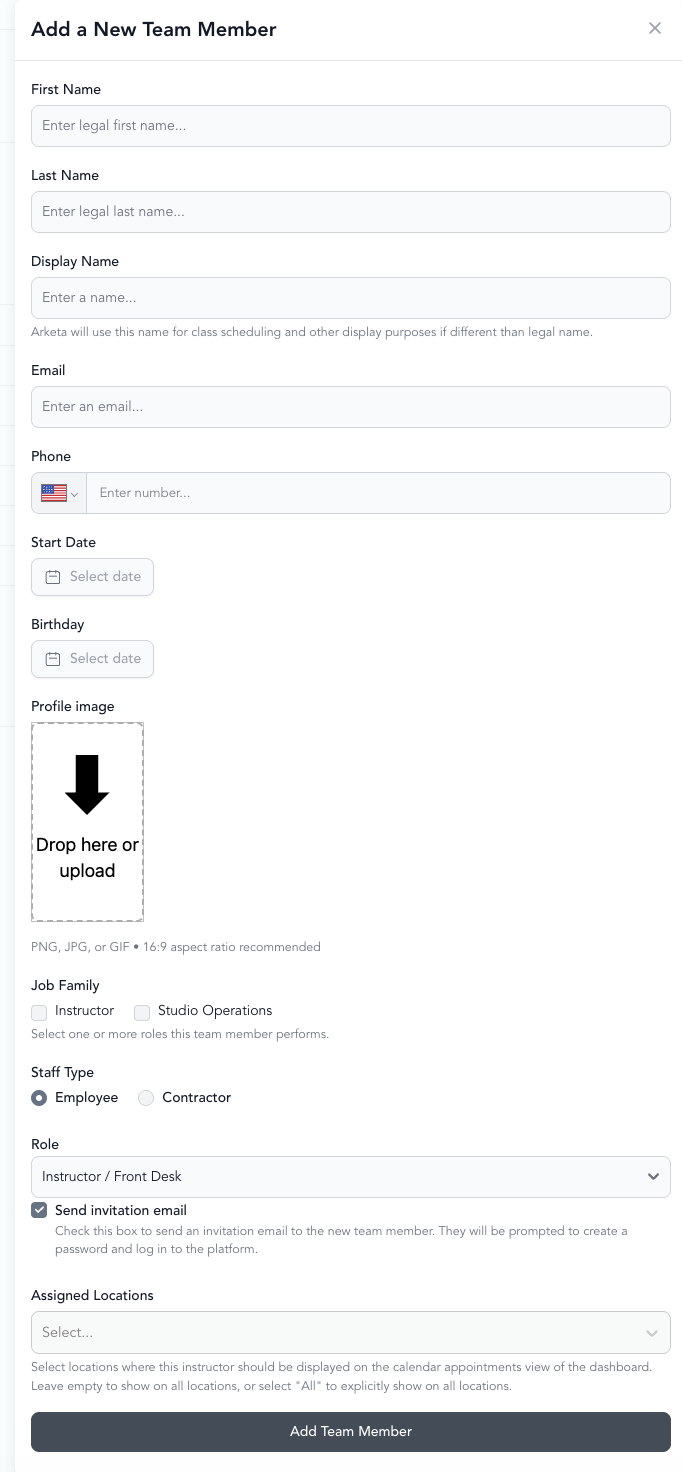
The team member receives an invitation and can log in at dashboard.arketa.com. They'll reset their password at app.arketa.co/forgotpass.
You can use the same email for an instructor even if they already have a client account. There's no need to create a separate account for team members who are also clients.
For the best appearance, use a square profile photo. Ideal team member photos are 280 x 280 pixels.
Add yourself as a second team member (Individual plans)
If you're on an Individual plan, you can add yourself as a team member to create a secondary appointment calendar. This is useful when you offer different types of private services with separate availability (e.g., in-person vs. virtual privates).
Use an alias email so booking confirmations don't go to multiple inboxes:
- Main account:
owner@yourstudio.com - Alias:
owner+private@yourstudio.com
Alias emails (using a + before the @) deliver to the same inbox but count as separate addresses.