
Unpaid bookings report
See all reservations that haven't been paid.
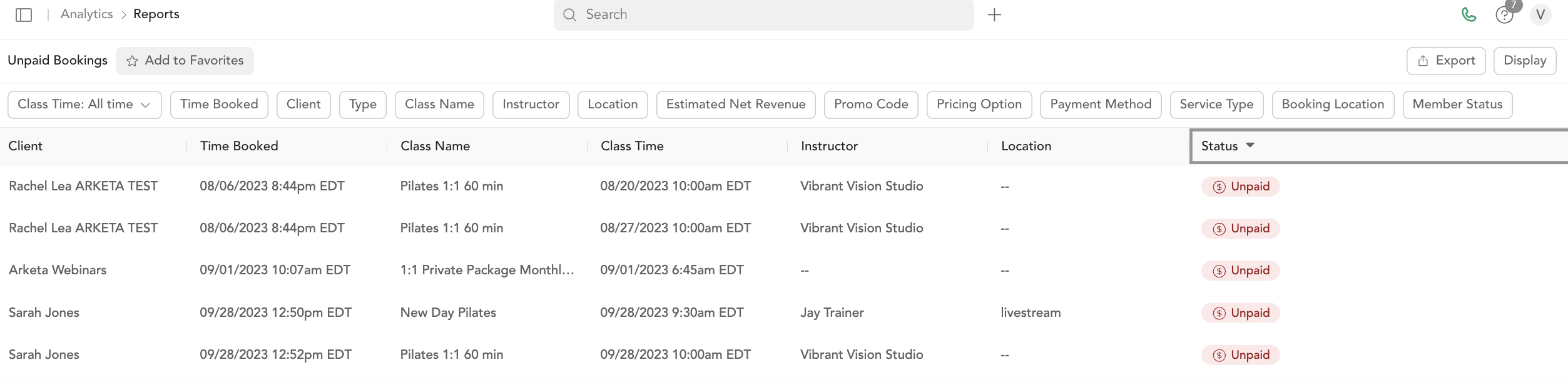
The Unpaid Bookings report shows all reservations where payment is still outstanding. Use this to identify clients who joined a class without completing checkout — common with "pay later" bookings or manually added reservations.
Columns
Same structure as the Booking Report, filtered to show only reservations with unpaid status.
| Column | Description |
|---|---|
| Customer | Client name |
| Date purchased | When the booking was made |
| Class name | Name of the class |
| Class time | Class start time |
| Instructor | Instructor |
| Location | Location |
| Client email | |
| Type | Booking type |
| Estimated net revenue | Projected revenue |
| Coupon code | Promo code used |
| Package name | Pricing option |
| Payment method | Payment method on file |
| Status | Booking status |
| Service type | Service type |
| Booking ID | Unique booking ID |
Resolving unpaid bookings
From a client's profile or the check-in screen:
- Find the unpaid reservation
- Click Update Payment or Collect Payment
- Process the payment

See reservation statuses for the full list of status types.
Automatic resolution and cancellation timing
If you enable the Unpaid Reservation Resolver in Business settings, Arketa tries to resolve these unpaid bookings for you — applying an available pricing option, optionally charging the payment method on file, and optionally canceling the booking if nothing works.
The resolver follows a fixed schedule:
- It starts retrying from 3 days before the class start time, but it only takes action (charge or cancel) within the final 6 hours before class start — never earlier. Before that 6-hour mark each run simply defers and tries again later.
- It rechecks roughly every 2 hours, so a booking is resolved or canceled at some point during the last 6 hours before class, not at a single exact minute.
- Because it only acts inside that final 6-hour window, resolution is not guaranteed to complete before class — for example, if a payment method keeps failing.
If Cancel Unresolvable Reservations is on, a booking that still can't be resolved is canceled within those final 6 hours and the client receives a cancellation email.