
Livestream classes
How to add a virtual class to your schedule using Zoom or a custom streaming link.
You can run virtual classes through Arketa using either the Zoom integration (which auto-creates unique meeting links) or any other streaming platform by pasting in a custom link.
Prerequisites
If you want to use the Zoom integration, connect your Zoom account first. If you're using another streaming platform (YouTube Live, Vimeo, StreamYard, etc.), you just need your streaming URL ready.
Add a livestream class
Start adding a class
Go to Classes → Full Schedule → Add New.
Set location to Virtual
In Basic Information, set Location to Virtual.
Choose your streaming link
Livestream Link — Paste in any URL. Use this if you're on another platform, want to reuse a permanent Zoom link, or need more control over your meeting settings.
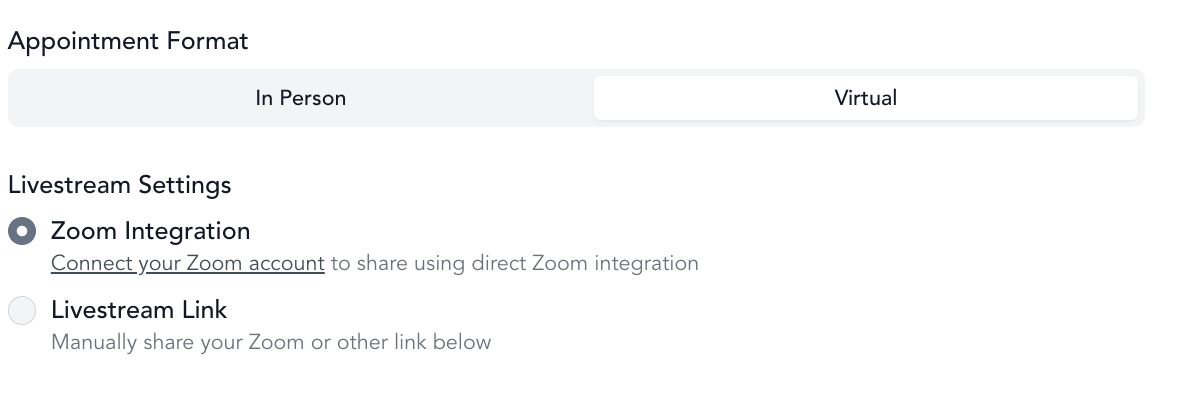
Finish setting up the class
Fill in the remaining class details (schedule, pricing, capacity, etc.) and click Save Class.
For livestream classes, set capacity to a higher number (100+) if you don't need to limit attendance. Unlike in-person classes, there's no real capacity constraint for virtual sessions.
Client experience
When a client books a virtual class, they receive a booking confirmation email with the Zoom link (or your custom streaming URL). They also get a reminder email before class with the link. Zoom link will only be included in the emails if the correct handlebar is used in the transactional message set up AND if the link is available at the time of that email send.
When using the Zoom integration, the link includes the meeting password (if this has been set up in your Zoom account beforehand), so clients just click and join without entering a password separately.
Starting class
You can start your Zoom class from:
- Your Arketa dashboard — recommended, since it confirms you're in the right meeting
- The Zoom app directly — also works fine when using the Zoom integration
If you're using a custom streaming link, start your broadcast on whichever platform you're using.
Do I have to use Zoom?
No. You can use any streaming platform — YouTube Live, Vimeo, StreamYard, or anything else. Just select Livestream Link and paste your URL. The client experience is the same: they get the link in their confirmation and reminder emails.
Troubleshooting
Clients can't find the link Check that the class is set to Virtual and a link has been generated or pasted. For Zoom classes, the link is only created ~24 hours before class, so it won't be visible before then, nor will it send in transactional emails triggered before link creation.
A client booked right before class and didn't get a reminder The pre-class reminder email is sent to everyone booked at the time it goes out (up to roughly 45 minutes before class). A client who books after that point won't receive the reminder — but their booking confirmation email includes the class link, as long as your confirmation template uses the class-link handlebar (see transactional messages), so they can still join. There isn't a separate link-only email beyond the confirmation and the reminder.
Zoom link has a waiting room / password prompt Make sure passwords are embedded in the link. See Zoom best practices for how to handle waiting rooms and passwords.
I want to record and upload the class Enable automatic recording in your Zoom settings and turn on the auto-upload feature in Arketa. Auto-upload Zoom recordings →