
Class packages
Create a bundle of credits clients buy upfront and use to book classes over time.
A class package (also called a class pack) is a set of credits clients purchase upfront and use to book classes. They're one of the most popular pricing options in fitness because they reward commitment while giving clients flexibility.
Class packages use credit-based pricing. When a client books a class with a package, a credit is deducted from their balance. If the booking is cancelled, the credit is returned to the client's package balance — no dollar refund is issued to their credit card. This is different from drop-in pricing, where cancellations refund money back to the card.
Create a class package
- Go to Setup → Pricing Options
- Click Add New
- Select Class Pack (or Package)
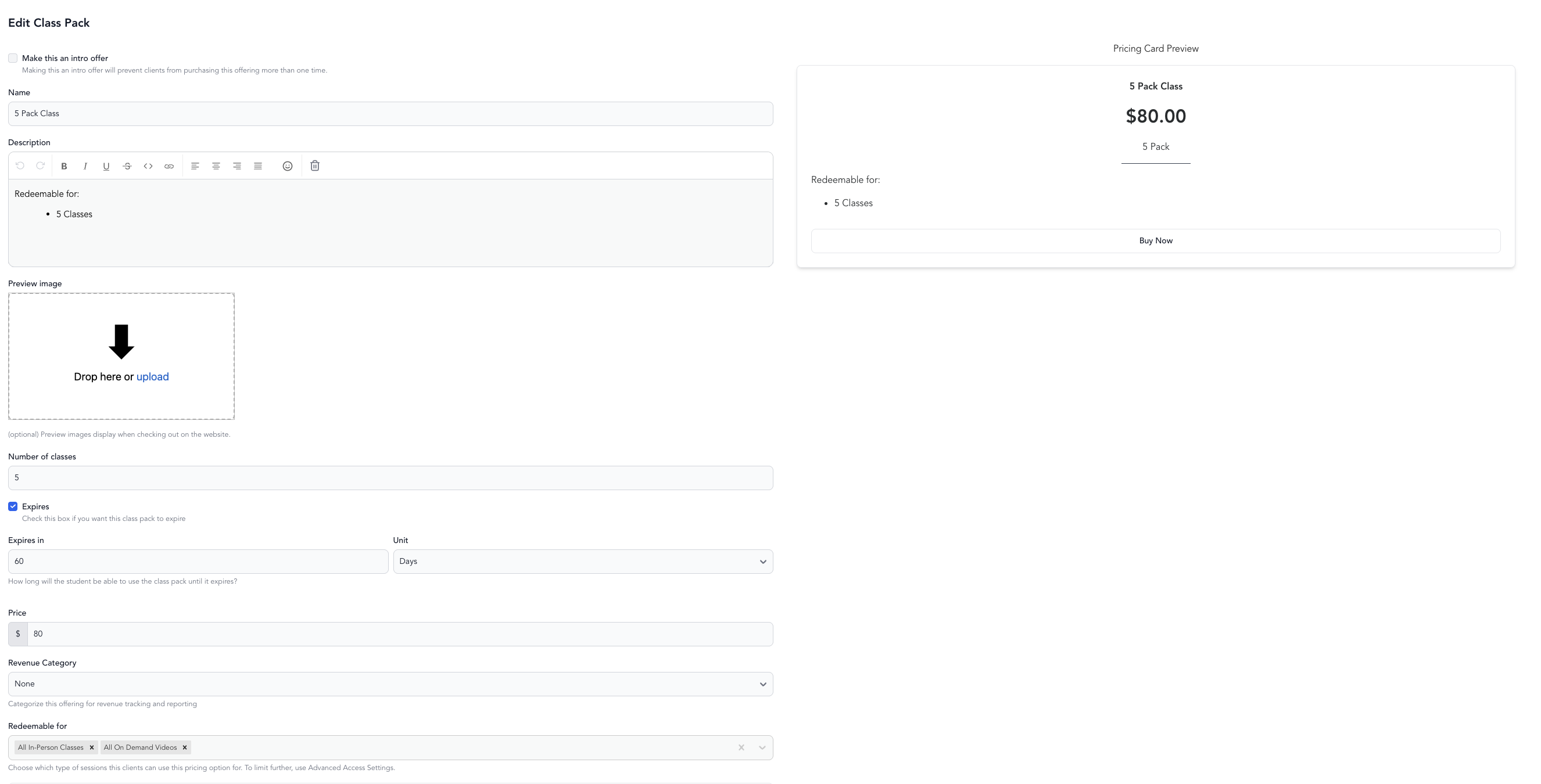
- Configure:
| Setting | What it does |
|---|---|
| Name | What clients see at checkout (e.g., "10-Class Pack") |
| Number of credits | How many classes the pack includes |
| Price | Total purchase price |
| Expiration | How long credits are valid (e.g., 90 days). Credits usually count down from the purchase date — but if you set the pack to activate on a specific date, expiration is measured from that activation date, so a client who buys after that date gets a shorter window. Leave blank for no expiration. |
| Rollover | Whether unused credits carry over (not always available) |
| Service types | Which classes this pack can be used for |
- Save and make active
Guest usage and family sharing
To allow clients to share their pack with guests or family members, enable Allow Guest Usage in the Advanced Access Settings on the pricing option. See family sharing.
What clients see
When clients have an active class pack, Arketa automatically applies it at checkout for eligible classes. They see their remaining credits in their account.
A pack is only "eligible" for a class when its Redeemable for setting matches the class's location type. Redeemable for is its own field on the pricing option, directly above the collapsible Advanced Access Settings section — not inside it. A pack set to Live classes won't apply to In Person classes, and vice versa. If a client has credits but the booking flow still prompts for a payment method, check that the pack's Redeemable for location type matches the class being booked — this is the most common cause.
Advanced Access Settings only add access — they never take it away. Fields like Applies to specific class templates and Applies to service categories grant access on top of Redeemable for; they cannot narrow it. If you select In Person under Redeemable for, the pack works for every in-person class on your schedule, even when you list only a few service types under Advanced Access Settings. To limit a pack to specific service types, clear the location types from Redeemable for and list only those service types under Applies to specific class templates.
Best practices
- Create packs in common sizes (5, 10, 20 classes) to give clients clear choices
- Add an expiration to create urgency — 90 days is standard, though some studios go up to 6 months. Keep in mind a package won't appear as a purchase option for a class scheduled after it would expire — if clients book far in advance, set the expiration long enough to cover your booking window, or set the package to activate on first use rather than at purchase.
- Price the per-class rate lower than your drop-in to reward commitment
- Set a pack with 1 credit as a $0 option for free classes that need the automatic waitlist feature
Multiple credits per class
If some classes require more than 1 credit per booking (e.g., 2 credits for a premium class), enable this in Settings → General Business Settings and set the credit amount per service type. See credit allotments.