
Subscription payment failures
What happens when a recurring membership payment fails and how to resolve it.
When a subscription renewal fails, Arketa follows a retry process before marking the subscription as past due. Here's what happens and what you need to do.
Why a client can have access without paying
Sometimes a client can book a class even though you don't see a completed payment. That's usually expected — access and payment aren't always tied together. Here are the five most common reasons:
-
Free class or trial period — if you offer free classes or a trial, clients are granted access without a payment during that promotional window.
-
Comped by staff — a team member applied a promo code or added the client for free from the dashboard, so no charge was collected.
-
Subscription paused with access — the membership is paused, but you chose to let the client keep booking during the pause.
-
Payment still retrying — the subscription payment failed but the subscription is not yet cancelled, so the client keeps access through the retry window (see What happens when a subscription fails below).
How to tell which applies
- Go to Customers → Clients → open the client's profile
- Check Packages, Subscriptions & Bundles to see whether they're on a trial, a comped item, or a paused membership
- Open the reservation and check its payment status — an unpaid reservation tied to a "Past due" subscription points to a payment still retrying
If the reason is a still-retrying payment, use the Resolve a subscription failure steps below. For paused memberships, promo comps, or free adds, the client is meant to have access — no action needed.
Bookings made before a membership was canceled
When a membership is canceled, the classes the client had already booked with it don't disappear on their own. Arketa applies your Action on subscription cancellation setting to each of those upcoming bookings:
- Mark as unpaid — the client keeps their spot. The booking still reads Confirmed on the roster, but its payment status becomes Unpaid, so you can collect payment or cancel it yourself.
- Cancel reservations — the spot is released and the client comes off the class.
Set this at Settings → General Business Settings → Subscription & Payment Settings → Add action on subscription cancellation.
This is separate from Allow unpaid bookings on the service type and pricing option. Those control whether a client can create an unpaid booking at checkout. The setting above only decides what happens to bookings that already existed when a membership was canceled — so you can have unpaid bookings switched off everywhere and still see unpaid reservations appear after a cancellation.
What happens when a subscription fails
- Initial failure — Stripe declines the charge on the renewal date
- Automatic retries — Arketa retries the payment up to 8 times within 30 days. The system uses a smart algorithm to determine the optimal time of day to attempt each charge, maximizing the chance of success.
- Client notification — the client receives an email asking them to update their payment method
- Past due status — if all retries fail, the subscription moves to "Past due"
- Access restriction — if you enable Block booking when subscription fails (Settings → Subscription & Payment Settings), a failed subscription is blocked from booking until a renewal payment actually succeeds. A retry that is still "Processing" does not lift the block — the subscription stays blocked while a payment is in flight, not only once it has failed. This matters for delayed payment methods like BECS or SEPA direct debit, where a retry can show "Processing" for several days before it clears.
Arketa never automatically cancels a subscription. Even after all retry attempts are exhausted, the subscription remains in "Past due" status — it is not canceled. Only a client or a staff member can cancel a subscription. This means you always have the opportunity to recover the payment and retain the client.
Why a period can show unpaid after a recent charge
When a renewal fails, Arketa's retries can collect that invoice days or weeks later — so a charge a client sees on their bank statement may be paying an earlier, overdue billing period rather than the current one. Each billing period is marked paid only when its own invoice is collected.
That means a current period can correctly show Unpaid even though a charge succeeded recently, if that charge cleared a previous period's invoice while the current period's invoice is still failing. To confirm which period a payment covers, match the invoice to its billing period on the subscription — not to the date the charge finally succeeded.
Resolve a subscription failure
- Go to Customers → Clients → open the client's profile
- Find their subscription (it will show "Past due" status)
- Update their payment method (or have them update it themselves)
- Once updated, retry the failed payment from the subscription detail
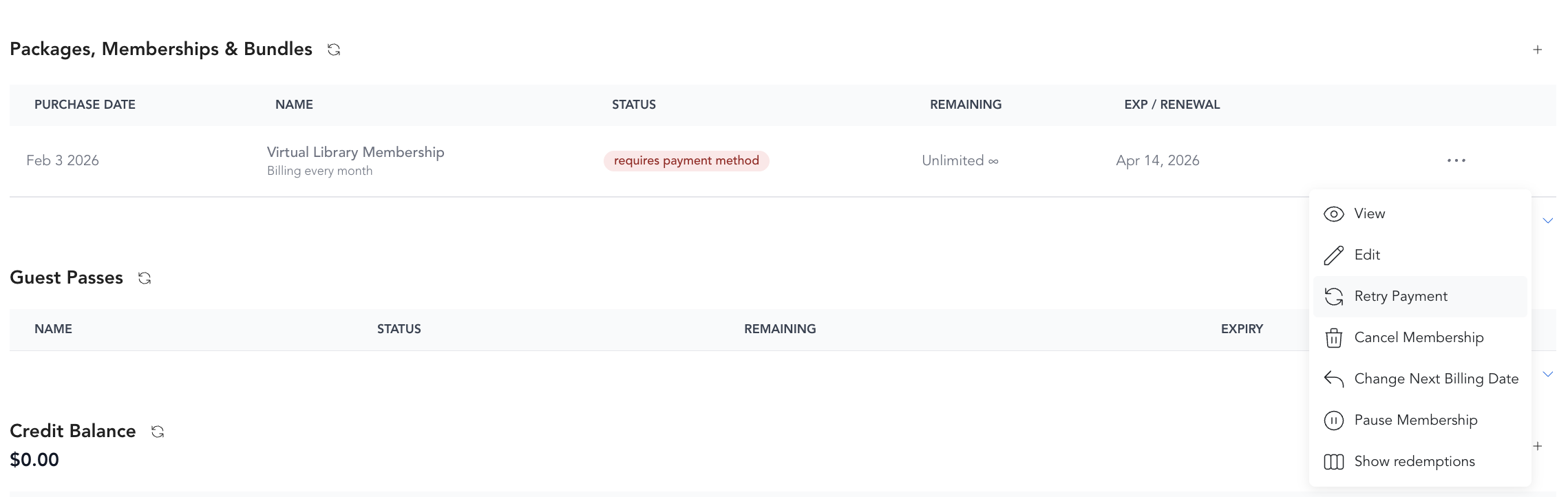
After a successful retry, the subscription returns to active status and any blocked access is restored.
Resolving unpaid reservations
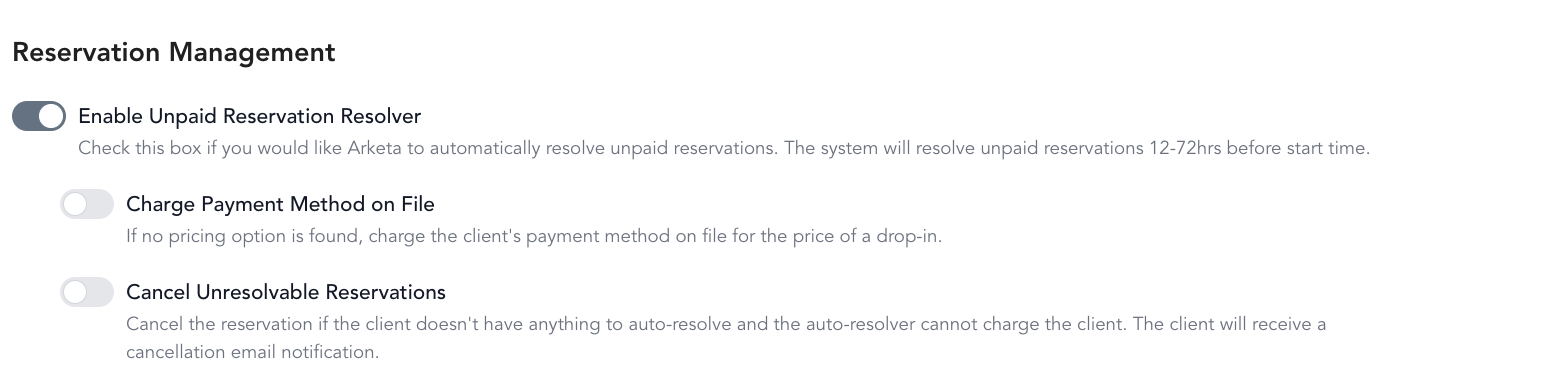
If a client has unpaid reservations linked to a past-due subscription, you can enable Unpaid Reservation Resolver in Settings → General Business Settings. This setting can:
- Automatically charge the payment method on file to resolve unpaid reservations
- Or hold the reservation as unpaid until the subscription is resolved
Notifying clients
Arketa sends automated failed payment notifications to clients. You can customize these emails in Settings → Transactional Messages. You can also reach out manually via the Inbox or by phone.
Preventing future failures
Encourage clients to keep their card information updated. Send a reminder automation 2 weeks before a card's expected expiry (if you collect card expiry info), or include a link to update payment methods in your routine client communications.