
Failed payments
Retry declined payments and resolve one-time payment failures.
When a payment fails — due to an expired card, insufficient funds, or a bank decline — you can retry it manually or have the client update their payment method.
Retry a failed payment on a subscription
- Go to Customers → Clients → open the client's profile
- Find the pricing option that is unpaid
- Click the ... and then select Retry Payment
- Select the card on file or add a new payment method
- Click Retry Payment
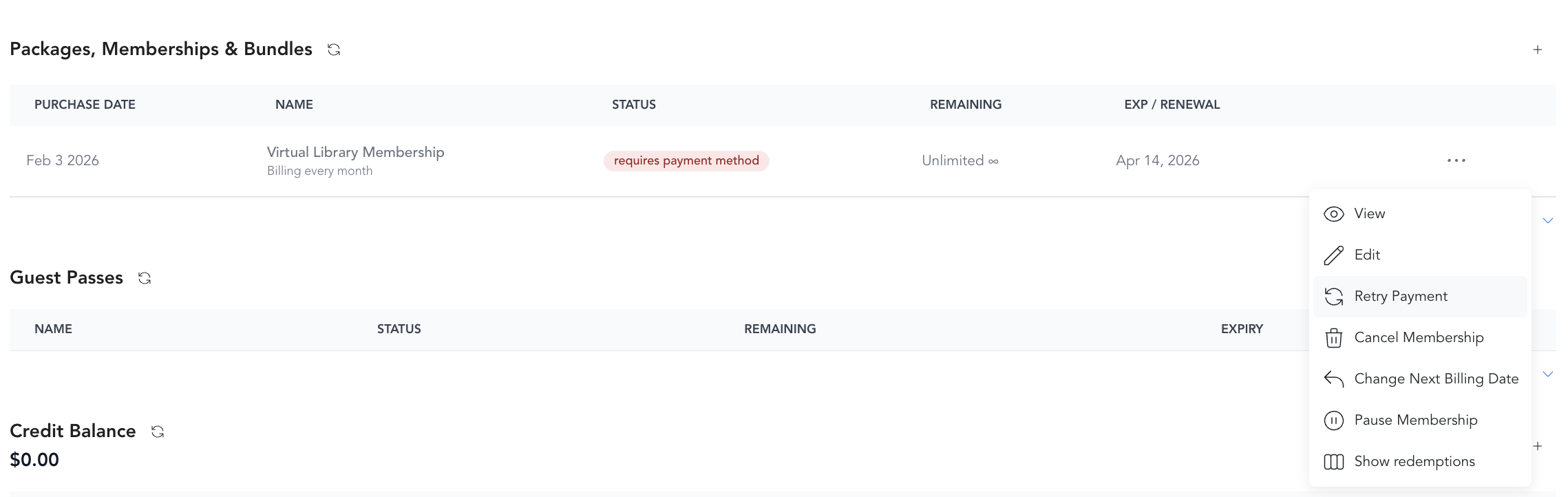
If the retry succeeds, the payment status updates to Succeeded and the client's access is restored.
If the retry fails again
If retrying the same card fails, the issue is likely with the card itself:
- Card expired
- Insufficient funds
- Bank blocking the charge (sometimes happens with international cards)
Ask the client to update their payment method. You can:
- Update it from their profile
- Send them a payment update link via email — they receive a secure link to enter a new card themselves
If Retry Payment shows an error like "This payment requires additional user action" or "Invoices with pending payments waiting to clear cannot be paid, voided, or marked uncollectible," the card needs extra verification from the client's bank (3D Secure), or a previous attempt on that invoice is still processing. You can't complete that verification on the client's behalf, so retrying the same card again won't work. Resolve it the same way — charge a different card, or send the payment update link so the client can complete the payment themselves.
Automated retry for subscriptions
For recurring subscription failures, Arketa retries the payment up to 8 times within 30 days, using a smart algorithm to determine the best time of day to attempt each charge. If all retries fail, the subscription moves to "Past due" — but it is never automatically canceled. Only a client or staff member can cancel a subscription. See subscription failures for the full process.
Blocking bookings on failed payments
You can set Arketa to block a client from booking new classes if they have a failed subscription payment. Enable this in Settings → General Business Settings → Block Booking When Subscription Fails.

Retry a declined payment or late-cancel/no-show fee
For a declined charge or an unpaid late-cancel or no-show fee, retry it straight from the client's payment history:
- Go to the client's profile
- Open the Payments section
- Select the failed payment, or click the Item Name to open the invoice
- Click Retry Payment
Recharge an unpaid invoice after updating a card
If the original card was the problem, update the client's card first, then recharge the invoice against the new card:
- Update the client's credit card on file
- Open the unpaid invoice
- Select Actions → Recharge to run the payment against the new card
Retry a class pack or order payment
For a failed class pack purchase or other order, retry the charge from the order itself:
- Open the related order for the purchase
- Click Retry in the top-right corner to attempt the charge again
You are not able to retry a failed payment on a one off purchase. Simply try to run the purchase through again.