
Pause, modify, or cancel a subscription
Manage client memberships — pause billing, change the plan, or cancel.
View a client's pricing options
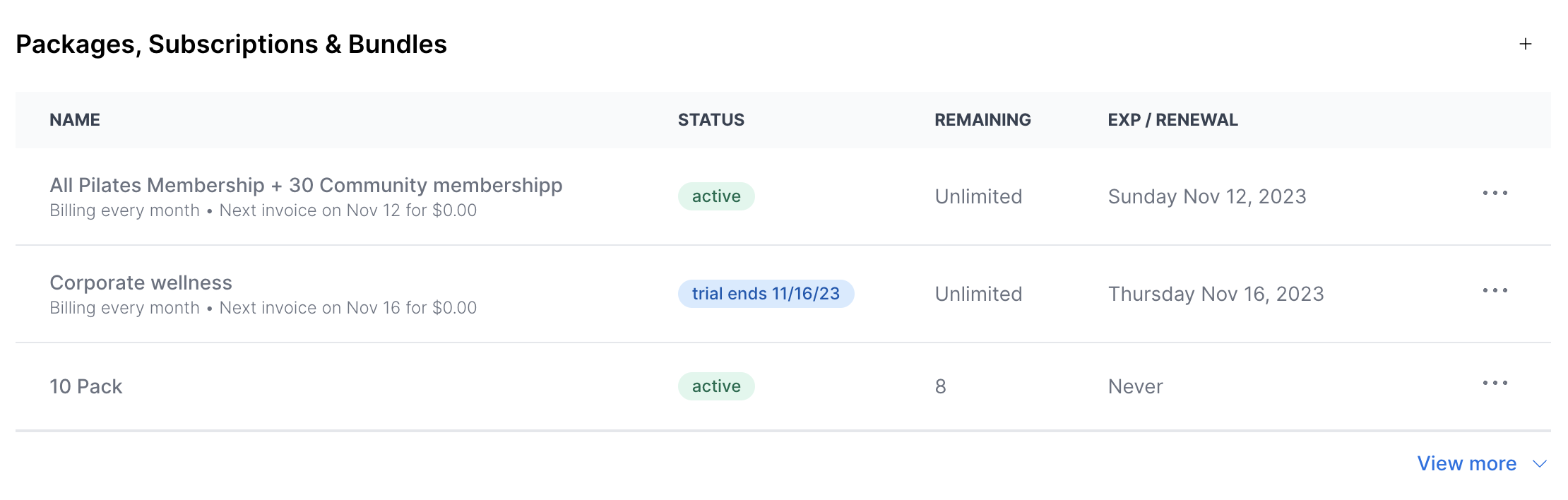
From a client's profile, you can see every pricing option — memberships, packages, subscriptions, and bundles — that's been granted to them. Each row summarizes the option at a glance.
| Field | What it shows |
|---|---|
| Name | The membership name, how often it's billed, and when the next invoice generates. |
| Status | The current status of the membership or package. |
| Remaining | How many sessions are left on the package. |
| Exp/Renewal | The next billing date for active memberships; the cancellation date for canceled ones; the date a trial converts to paid; the activation date for a future membership; or the expiration date for a package (if applicable). |
Package details
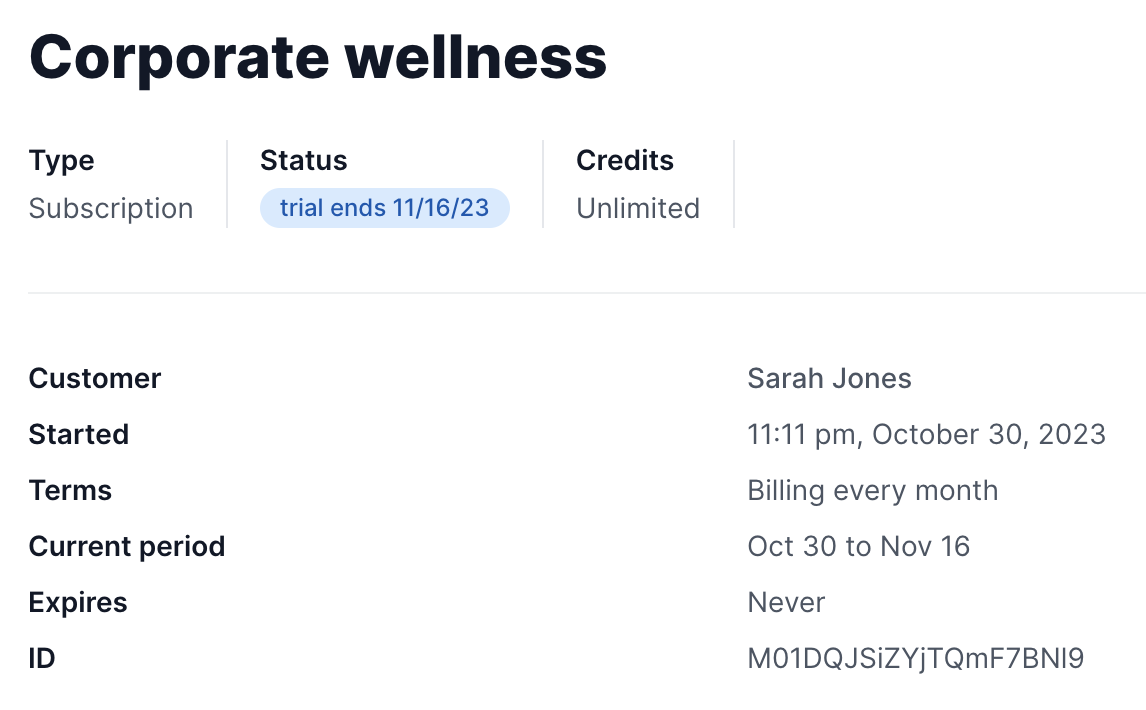
Tap into any package or subscription to see its full details.
| Field | What it shows |
|---|---|
| Type | Whether the option is a package, subscription, and so on. |
| Status | The current status of the membership. |
| Credits | How many credits remain on the pricing option. |
| Customers | The client's first and last name. |
| Started | The date the option was activated (usually the first purchase date). |
| Terms (subscriptions only) | How often the subscription is billed. |
| Current period (subscriptions only) | The current cycle of the membership. |
| Expires | When the pricing option expires. |
| ID | A unique identifier for each pricing option, so you can tell apart multiple purchases made from the same option. |
Pause a subscription
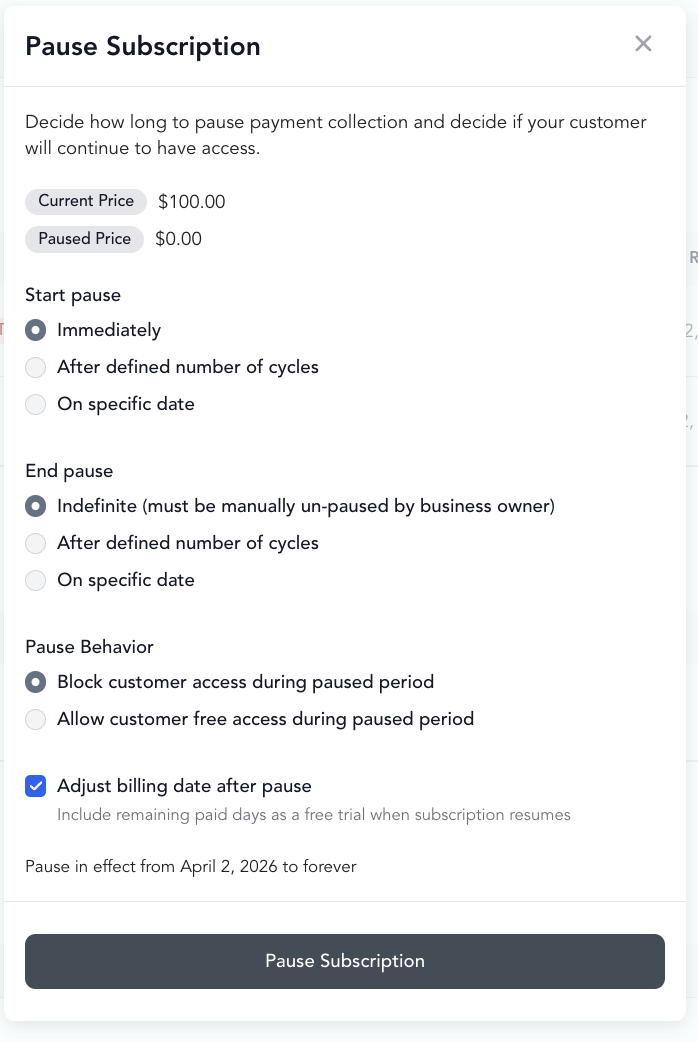
Pausing stops billing temporarily while preserving the client's membership. When the pause ends, billing resumes automatically.
- Go to Customers → Clients → open the client's profile
- Find their subscription
- Click Pause subscription
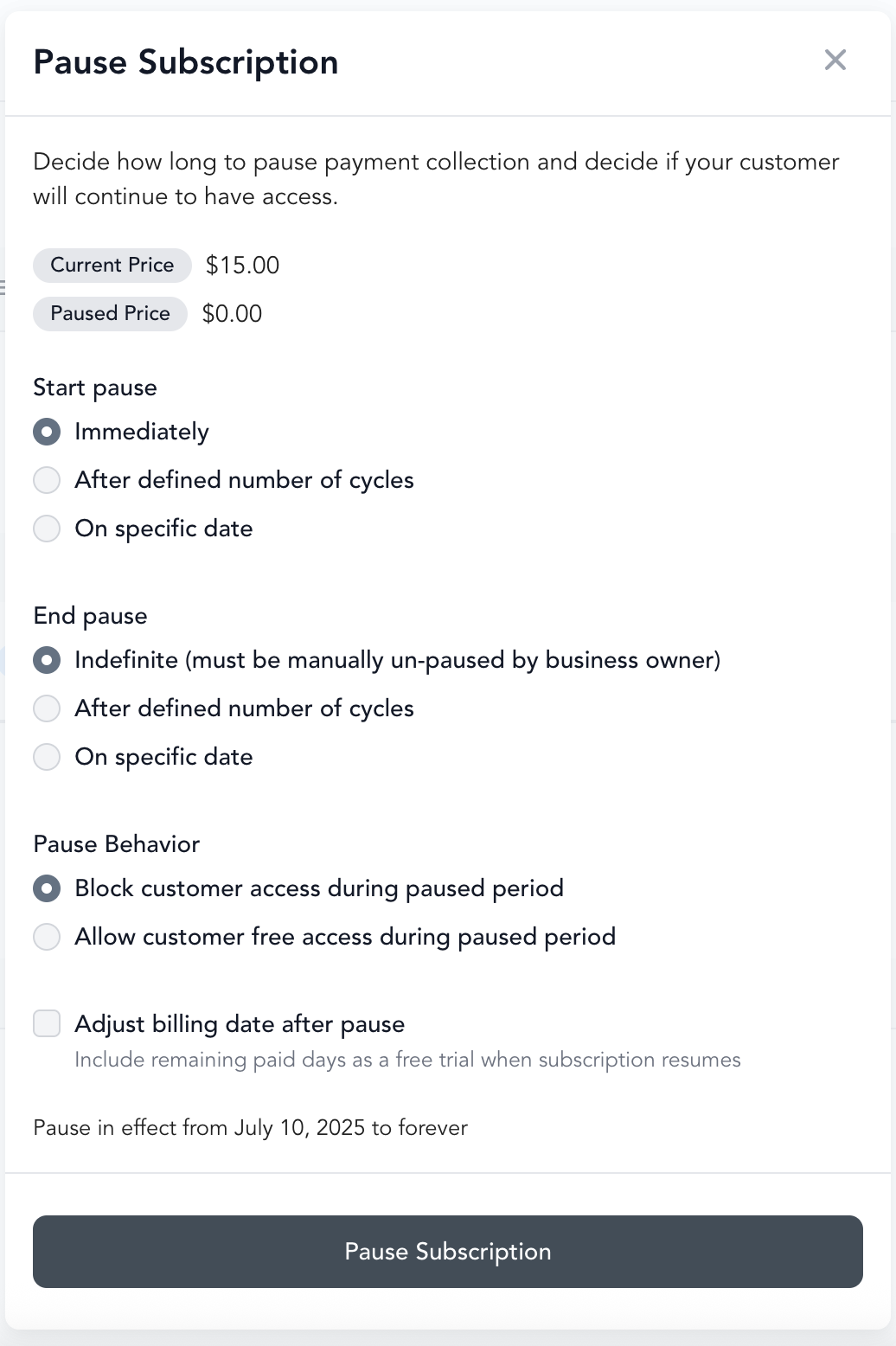
- Set the pause duration (or an end date for the pause)
Pause fees: If you want to charge a reduced rate during a pause (e.g., a $10/month hold fee), configure this in the pricing option settings under pause settings. The hold fee bills instead of the regular membership charge during the paused period.
A pause scheduled for a future date shows the full amount until it starts. When you set up a pause with a hold fee that begins on a future date, the membership still shows the regular membership amount as its Next invoice (dated on the pause start date) until the pause actually begins. Arketa switches the subscription to the hold fee automatically when the pause starts, and the next invoice then updates to show the reduced hold fee. The client is only ever charged the hold fee for the paused period — the full amount shown beforehand is just a preview, not an upcoming charge.
Credits while paused: By default, a membership does not add new class credits while it is paused — even if a renewal or hold-fee charge is collected during the pause. This is intentional: a paused membership keeps the client's existing unused credits but does not grant a fresh cycle. If you want renewals to keep adding credits during a pause, enable Can client still receive credits while plan is paused? in the pricing option's pause settings. So if a paused membership shows a successful charge but the credit balance did not increase, that is expected behavior unless that setting is turned on.
Why a "Canceled" charge can appear while paused: During a free pause (no hold fee), each billing date still generates an invoice that Arketa immediately voids — no payment is collected. This voided invoice shows in the client's payment history with a Canceled status. A Canceled line means no charge was made and no money left the client's account. If a client thinks they were charged while paused, open their Payments tab and confirm whether the charge shows as Succeeded (a real charge) or Canceled (voided, no charge). A pending amount on a bank statement after a paused billing date is usually a temporary authorization that drops off within a few business days, or a separate earlier charge.
Why the renewal date still moves while paused: Because each billing date still generates (and voids) an invoice, the Exp/Renewal date on the client's pricing option rolls forward to the next billing date every cycle — including on a pause set to Indefinitely. So an indefinitely paused membership can show a future renewal date and a new Canceled line after every billing date. Neither means the membership renewed or that the client was billed. To confirm, open the Payments tab and check that the line for that date reads Canceled rather than Succeeded.
Choose how long to pause
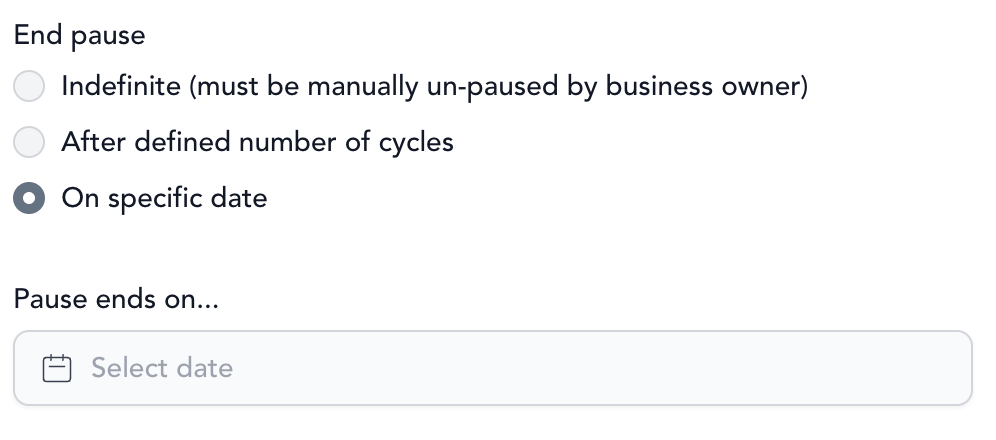
When you pause, choose how long the pause should last. Pick one of three pause types.
| Pause type | What it does | Charging behavior |
|---|---|---|
| Indefinitely | Pauses the subscription with no end date. To resume, you unpause it manually. | The client isn't charged again until you unpause. |
| Number of cycles | Pauses for a set number of billing periods. | Billing resumes automatically, and the client is charged again, once that many cycles have lapsed. |
| Until a custom date | Pauses payment collection until the date you set. | The client is charged on the first billing cycle after the pause end date. |
With Until a custom date, the client is charged the full amount on the first billing cycle after the pause end date — this charge is not prorated.
Set the pause behavior
When you set the pause duration, you also choose a Pause behavior that controls whether the client can use their remaining credits while the membership is paused.
- Allow customer free access — the client keeps using their credits during the pause but isn't billed.
- Block customer access — the client can't use the credits on their account while paused.
If you turn on Block customer access during paused period, Arketa automatically compensates the client for the unused days they've already paid for: those days are granted as a free trial on the first billing cycle after the subscription resumes, and the client's next invoice date reflects that free-trial period.
The optional Adjust billing date after pause checkbox does the same thing on its own — it rolls the client's already-paid remaining days into a free trial on their next billing cycle after the pause.
This permanently moves the client's billing day. The free trial runs from the day the pause ends until the client's paid days are used up, and the next billing date is the day that trial ends — which is rarely the same day of the month they were billed on before. Example: a client billed on the 14th is paused on the 17th with 28 paid days left. The pause ends on August 23, those 28 days become a free trial through September 21, and from then on the membership bills on the 21st. This is expected, and the free trial also appears in the client's payment history as a trial period line for the day the pause ended.
The automatic free-trial compensation only applies when Block customer access during paused period was selected at the time you paused.
Pausing edge cases
If a subscription is already set to cancel (for example, a set-term subscription), remove the cancellation date first, then pause it.
Pausing one subscription doesn't affect a client's other subscriptions or packs. If a client has more than one — say a Bronze and a Platinum membership — pausing Bronze leaves Platinum billing as normal. If a client needs more than one paused, pause each subscription separately.
Change the next billing date instead of pausing
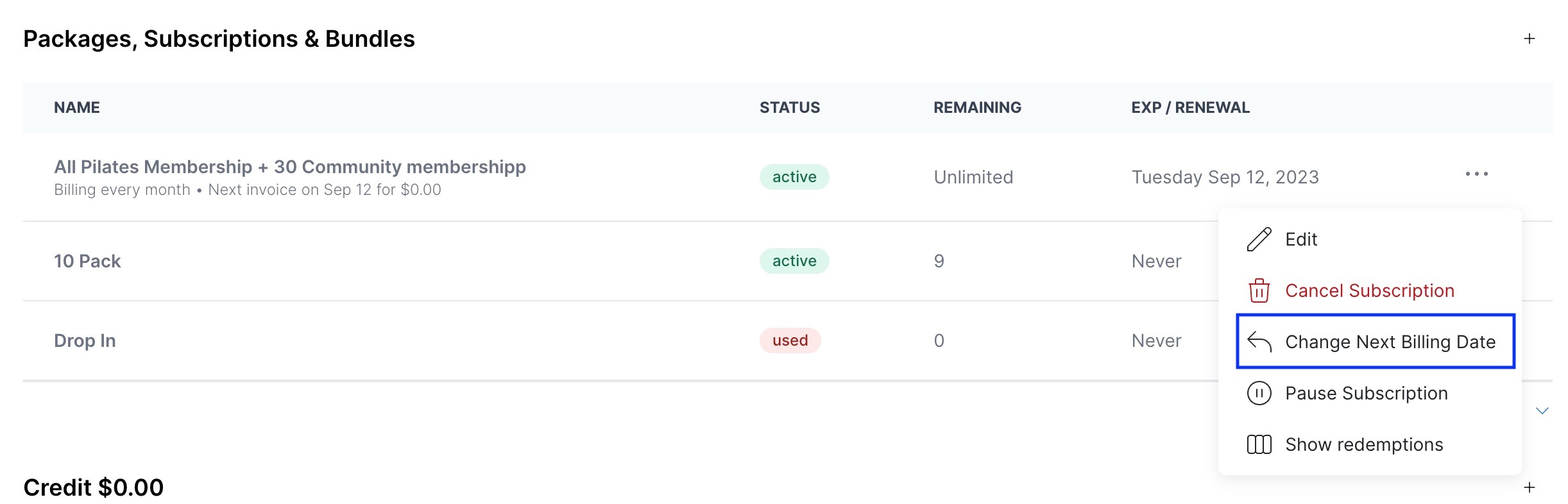
Instead of pausing, you can push back when the client is next charged. This is a clean alternative to pausing until a specific date, and unlike a pause the client keeps full access to their credits and the platform during this window.
- Open the client's subscription
- Select Change Next Billing Date
- Pick the new date you want the client to be charged
Modify a subscription
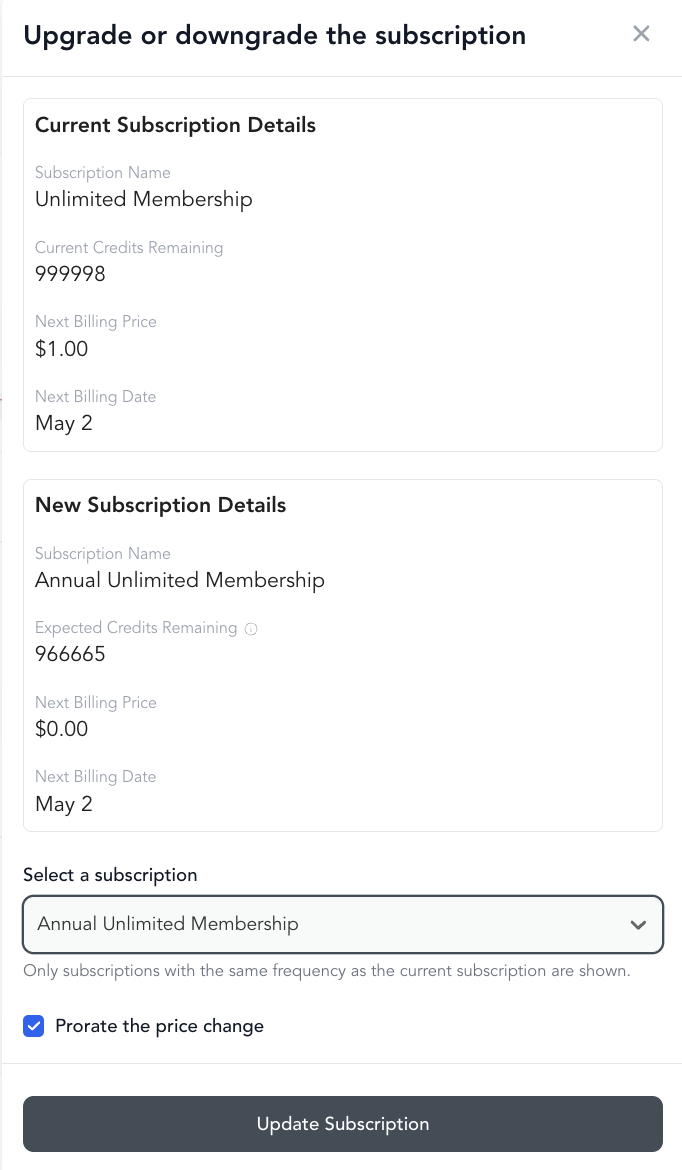
You can change a client's subscription to a different pricing option — useful when a client wants to downgrade, upgrade, or switch membership tiers.
- Open the client's profile
- Click into their active subscription
- Select Change Subscription
- Choose the new pricing option
- Confirm
The change typically takes effect at the next billing cycle, though this depends on your settings.
Edit the price or credits directly
Beyond switching to a different pricing option, you can edit the amount charged or the credits remaining on the client's current subscription.
- Click into the subscription
- Select Edit
- Change the Amount or Credits remaining
- Select Save Subscription
Editing a subscription doesn't notify the client. When you change a renewal date, expiration date, trial dates, pricing, credits, or any other detail, Arketa doesn't send them an automated notification. If you want the client to know about the change, message them manually.
Cancel a subscription
Subscriptions are only canceled when a client or staff member explicitly cancels them. Arketa never automatically cancels a subscription — even if a payment fails and all retry attempts are exhausted, the subscription moves to "Past due" status rather than being canceled. This gives you the opportunity to recover the payment and retain the client.
Staff-initiated cancellation:
-
Open the client's profile
-
Click into the subscription
-
Select Cancel subscription
-
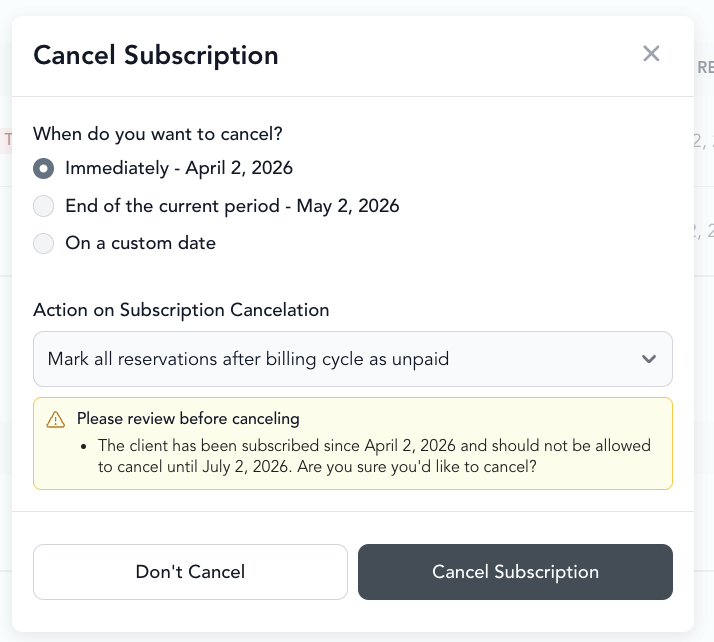
Choose whether to cancel:
- Immediately — access ends now
- At end of billing period — client keeps access until their current paid period ends
- After a number of billing cycles — keep the membership active for a set number of full billing cycles (1–12), then cancel. The subscription keeps renewing and billing through each chosen cycle and then cancels on a billing-cycle boundary, so every paid renewal is fully used and the client is never charged for a period they don't receive. Use this when you need to keep a membership active a little longer before it ends.
Client-initiated cancellation: If you've enabled self-cancellation, clients can cancel from their account. See self-cancel.
Why a cancellation can produce a prorated invoice
Setting a future cancellation date that falls before the client's next billing date produces a prorated invoice. The client is still billed on their normal billing date, but only for the partial period up to the cancellation date.
Example: a client's subscription renews on the 1st of every month. On December 6 you set a cancellation date of January 15. The January 1 invoice prorates to cover only January 1–15 — the client is charged on the 1st as usual, but not for the full billing cycle.
What happens to credits when cancelled
- Unused credits from a credit-based membership remain on the client's account until they expire
- Unlimited memberships — access ends at the cancellation date
- If you refund the current billing period, any credits used during that period may be reversed
Cancellation during a commitment period
If a client has a minimum commitment (e.g., 3 months) and wants to cancel early, Arketa enforces the commitment period. They may need to pay out the remaining months depending on your policy — this is configured on the pricing option.