
Billing intervals
Set how often memberships bill — monthly, weekly, annual, or custom intervals.
Billing intervals control how frequently a client's membership renews and how much they're charged each time. Arketa supports standard intervals as well as custom frequencies like every 28 days.
Available billing intervals
| Interval | Cycles per year |
|---|---|
| Weekly | 52 |
| Every 28 days | ~13 |
| Monthly | 12 |
| Quarterly | 4 |
| Half-year | 2 |
| Annual | 1 |
Set the billing interval
When creating or editing a membership:
- Go to Setup → Pricing Options
- Add or edit a membership
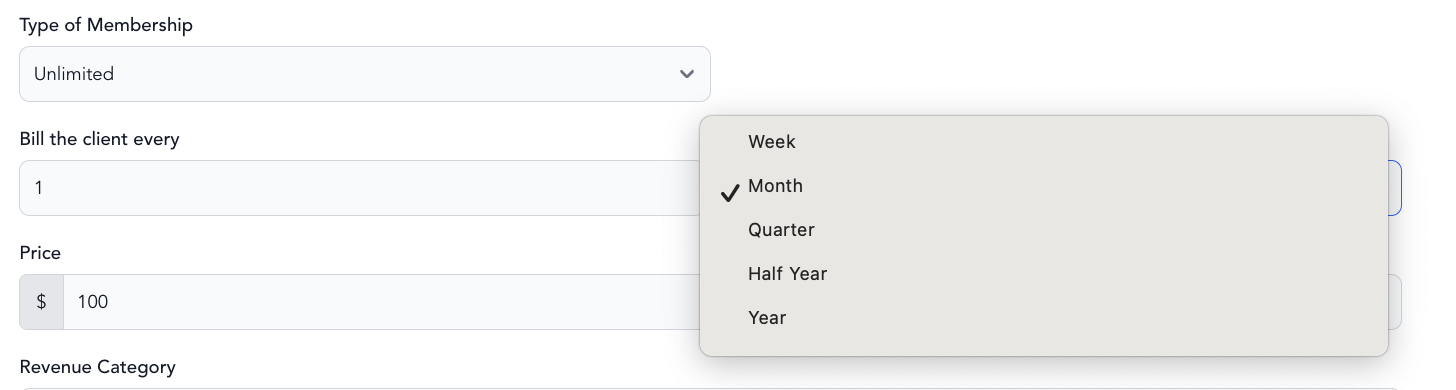
- Under Type of Subscription → Bill the client every
- Choose your interval
The 28-day billing trick
Billing every 28 days (4 weeks) results in approximately 13 billing cycles per year instead of 12 monthly cycles. Over the course of a year, this means one additional payment compared to monthly billing. For a $100/month membership, that's roughly $1,300 annually vs. $1,200 — a meaningful difference at scale.
This works because months have more than 28 days, so the billing date shifts forward slightly each cycle. Many fitness studios use this for their core membership to maximize annual revenue.
Custom billing intervals
You can also set a custom number of days, weeks, or months for the billing cycle — useful for class series, 6-week programs, or any non-standard schedule.
Changing a client's billing date
To change when an individual client's subscription bills:
- Go to Customers → Clients → open the client's profile
- Find their subscription in the Packages, Memberships & Bundles section
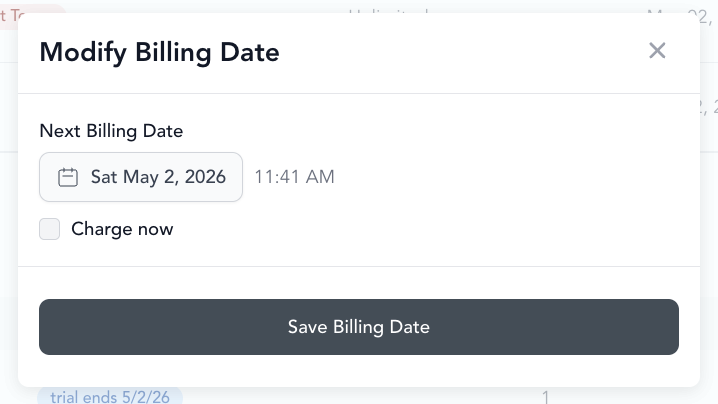
- Click into the subscription → Change billing date
- Select the new date
This only changes their individual billing date — it doesn't affect other clients on the same pricing option.
Edit a client's class pack credits
You can adjust how many credits a client has left on a class pack — for example to comp a make-up credit, correct a booking error, or honor a promise you made.
- Go to Customers → Clients → open the client's profile
- Find the class pack in the Packages, Memberships & Bundles section (the same place you change a billing date)
- Click into the pack and edit the number of credits remaining — you can add credits or remove them
- Save the change
This only affects this client's balance — it doesn't change the pricing option or any other client's packs.