
Move a client between classes
How to move a client from one class to another and handle the credit transfer.
You can move a client's reservation from one class to another directly from the check-in screen.
Move a client to a different class
Find the client in the check-in screen
Open the class in Full Schedule and find the client in the roster.
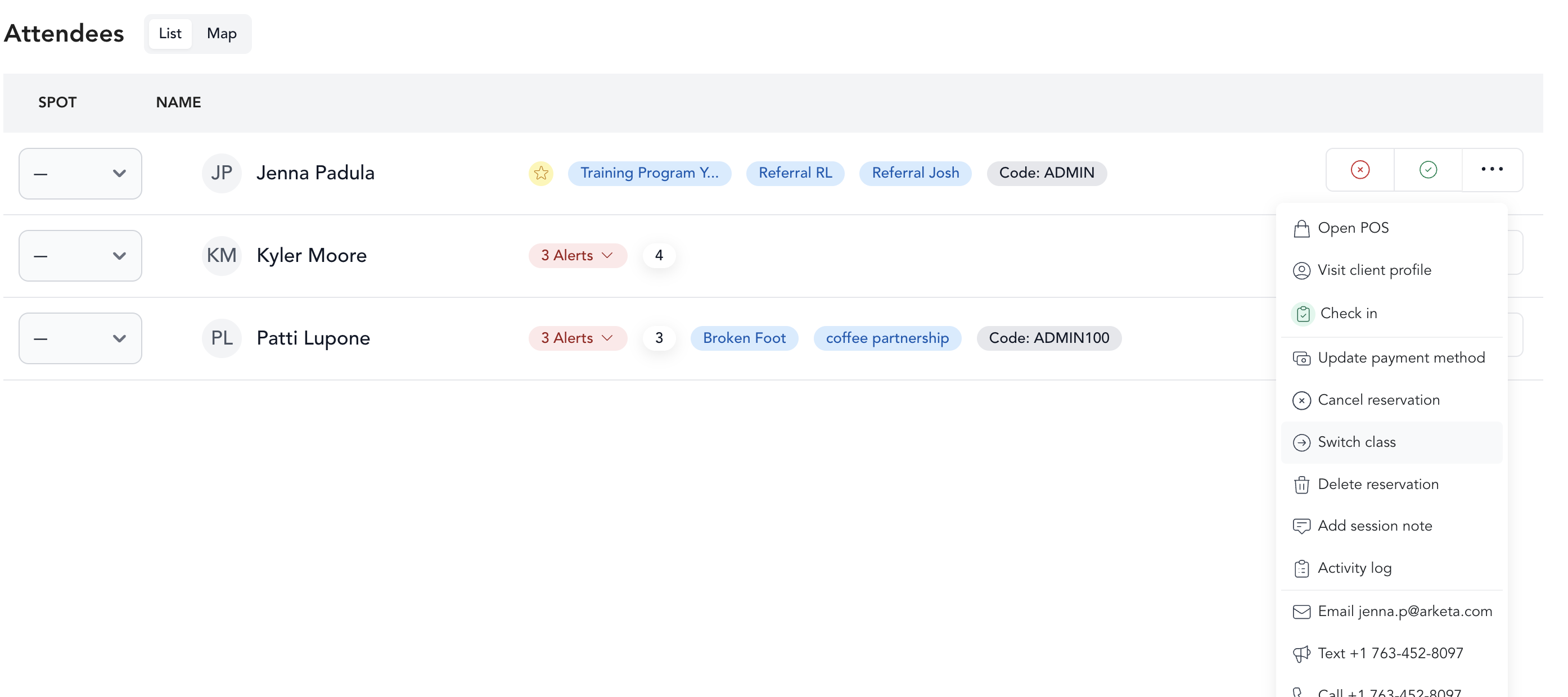
Select the new class
Choose the date and then select the class from the dropdown.
Add with Unpaid status
When adding to the new class, select Unpaid as the payment method. The original class reservation still has the credit attached to it.
Resolve payment on the new booking
Return to the new class. The credit that was freed up from the original reservation is now available. Find the client's reservation and resolve the payment using that credit.
The move process is two steps: add as unpaid to the new class, then return and apply the freed-up credit. This ensures the credit transfers correctly.
Moving a client who paid directly
If a client booked with a one-time payment (not a pack or membership), using the Switch Class flow will automatically trigger a refund and recharge. To avoid this:
- Cancel the original reservation and select No refund when prompted.
- Book the client into the new class using Free as the payment method.
This preserves the original payment without issuing a refund or charging the client again.
Move a client between spot-mapped classes
If you use spot booking and want to move a client to a specific spot in the new class, follow the same steps above but select the spot when adding them to the new class.