
Apple Pay and Google Pay
Accept Apple Pay and Google Pay in person and online.
Arketa supports Apple Pay and Google Pay through Stripe. Clients can pay with their phone or watch — contactless, fast, and secure.
In-person (card reader)
Both supported Stripe readers — the Stripe Reader S710 and the BBPOS WisePOS E — accept Apple Pay and Google Pay via NFC (tap to pay). When a client taps their phone or watch to the reader, Stripe handles the authentication and payment automatically.
No setup required beyond having the reader connected and active. See card reader setup for setup.
Online checkout
When clients check out in a supported browser — Safari on iPhone or Mac for Apple Pay, Chrome for Google Pay — the wallet appears as a payment option if the client has it set up on their device.
Google Pay works with no setup on your end. Apple Pay needs two things first: your domain registered, and — if you embed Arketa on your own website — one attribute in your embed code.
Register your domain for Apple Pay
Apple Pay needs your website registered with Stripe before it will appear at your online checkout. This is a one-time step.
Open Integrations
Go to Settings → Integrations and scroll to Apple Pay.
Add your domains
Enter your website domain and app.arketa.co, then save.
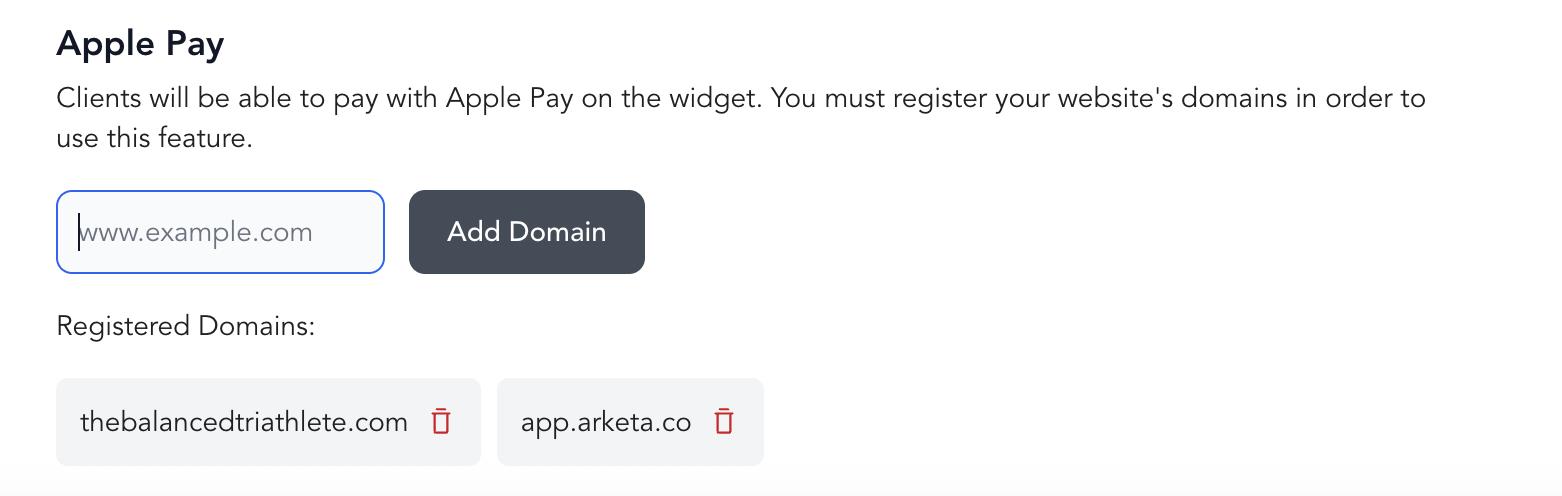
Register the exact domain clients see in the address bar at checkout. Subdomains count separately — studio.com, www.studio.com, and book.studio.com are three different registrations.
Google Pay needs no domain registration — it's available automatically for clients checking out in Chrome.
Allow payments in your embed code
If you embed the Arketa widget on your own website — Squarespace, Wix, WordPress, Webflow, Showit, or anywhere else — your embed code needs allow="payment" on the iframe. Without it, Safari blocks Apple Pay inside the embed and the button never appears, even when your domain is registered correctly.
Open the page where your widget lives, check the embed code, and add the attribute if it's missing:
<iframe
  id="sutraWidgetIframe"
  src="https://app.arketa.co/iframe/YOUR_URL_HERE/schedule"
  width="100%"
  frameBorder="0"
  allow="payment"
  allowfullscreen>
</iframe>
<script src="https://app.arketa.co/scripts/embed.js"></script>
Attribute order doesn't matter, and you should keep allowfullscreen — it controls a separate permission. Republish your page after the change.
This applies only to embeds on your own website. Your direct booking links already handle it.
Requirements
- Stripe must be connected and active on your account
- For in-person: a Stripe card reader purchased and configured
- For online: your domain registered for Apple Pay, plus
allow="payment"in your embed code if you embed on your own website
Apple Pay works in Safari. Google Pay works in Chrome. Clients using other browsers may not see these options.