
POS favorites
Pin frequently sold items to the top of your point of sale for faster checkout.
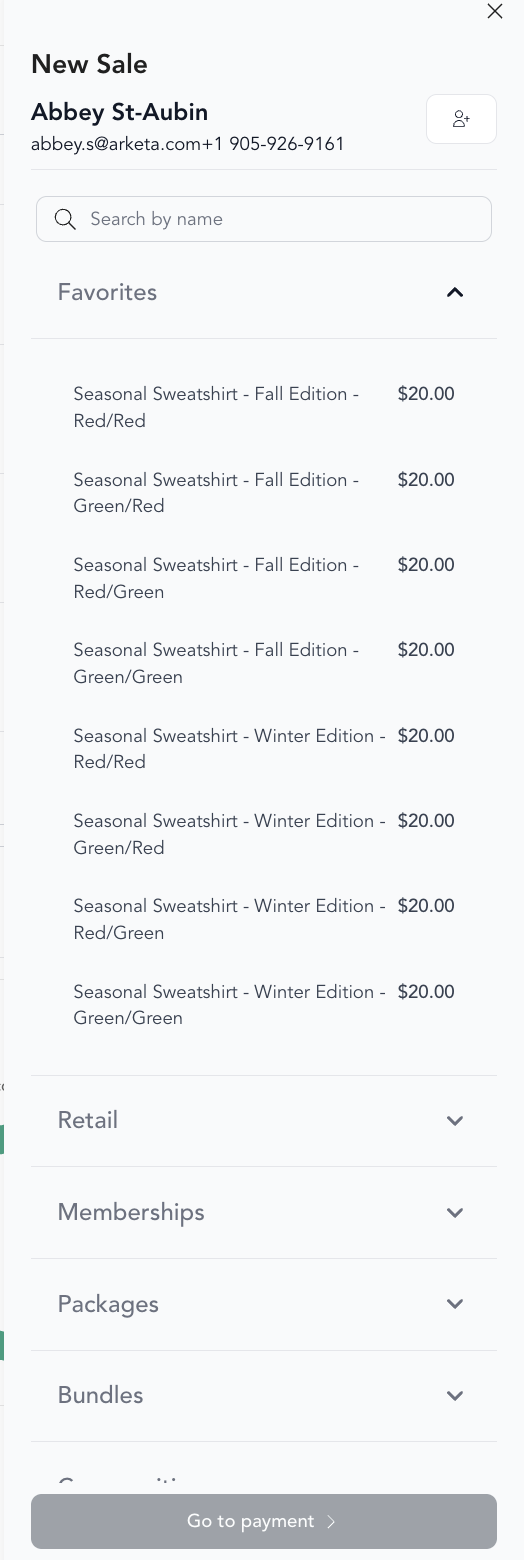
POS favorites let you pin your most commonly sold items to the top of the checkout screen so staff can add them with one tap — no searching through your full catalog.
Set up favorites
- Go to Point of Sale
- Click the star or favorites icon next to an item
- Favorited items appear at the top of the POS item list
What you can favorite
- Specific pricing options (class packs, memberships)
- Retail items
- Drop-in prices
- Gift card denominations
Best items to favorite
- Your most popular membership tier
- Your most common class pack
- Frequently purchased retail items (water bottles, accessories)
- Drop-in price for your main class type
Managing favorites
To remove a favorite, click the star again to un-pin it. Favorites are shared across your dashboard — all staff see the same favorites list.
Keep your favorites list short — 5 to 8 items is ideal. If you have too many favorites, they stop saving time.
Was this helpful?