
Cash payments
Process cash transactions and track them in Arketa.
When on our Studio plans, you can accept and log cash payments through the point of sale. Cash payments are tracked separately from card transactions and appear in your Cash Drawer report.
On Studio plans, you can also define custom payment method types (for example Check or Zelle) so staff can label offline payments more precisely at the POS and when marking invoices paid.
Process a cash payment
- Go to Point of Sale
- Add items and select the client (or walk-in)
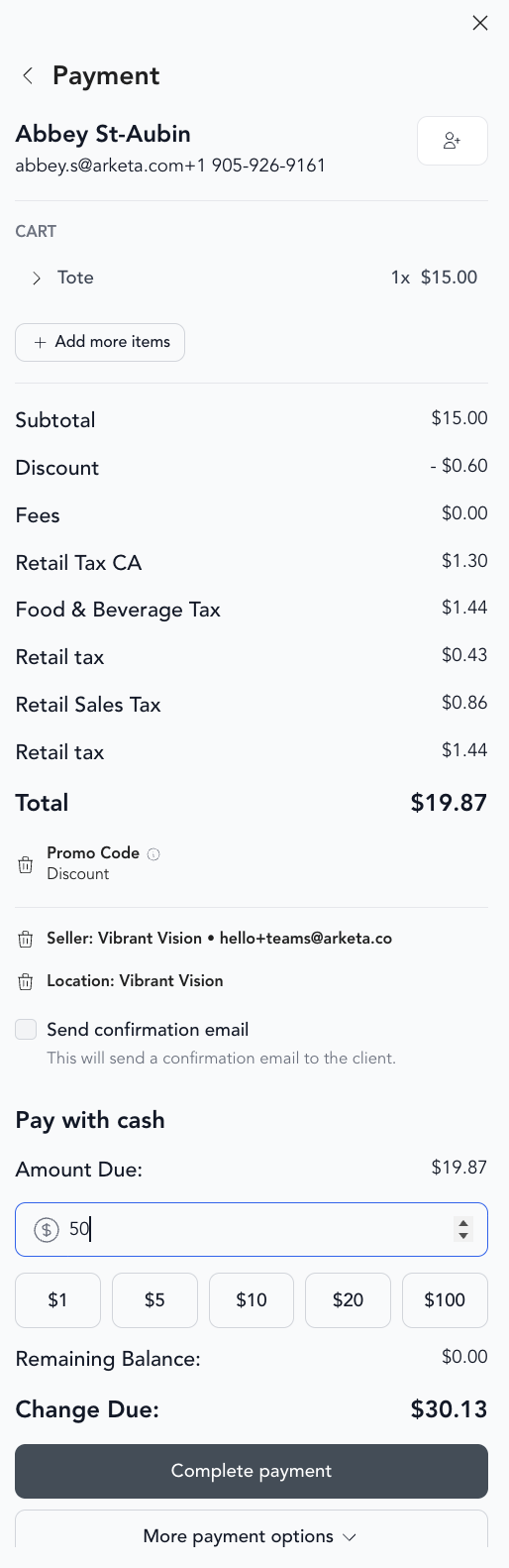
- At checkout, select Cash as the payment method
- Enter the amount tendered
- Arketa shows the change to give back
- Complete the transaction
The cash transaction is logged in your dashboard with the timestamp and amount.
What you can sell with cash
Cash payments work for any item in the POS — drop-ins, retail, gift cards, class packs. Memberships cannot be sold using cash checkout.
Cash Drawer report
Track all cash transactions in Reporting → Cash Drawer. The report shows:
- Number of transactions
- Net cash amount (before fees)
- Net card amount for comparison
- Total net amount for the period
Use this to reconcile your physical cash drawer at the end of each shift or day.
If you don't see this report, please contact our support team to have it enabled.
Custom payment method types
If you take checks, bank transfers, or other offline methods besides physical cash:
- Enable Custom payment method types in Settings → Business
- Add your labels under Settings → Payment method types
- At POS (for subscription carts paid offline) or on Mark as paid for invoices, choose the matching type
Tips for cash management
- Set a cash float (starting amount in your register) at the beginning of each day
- Reconcile your drawer at the end of each day against the Cash Drawer report
- Log all cash transactions in Arketa at the time of sale — don't batch them later
Cash and accounting
Cash payments show as revenue in your reporting from the date of the transaction. For accounting purposes, they're included in your total revenue but tracked as a separate payment method.