Transferring clients to Arketa
Moving from another platform? Here's how to bring your existing clients over and what to send them.
If you're switching to Arketa from another platform, you can migrate your existing client list so clients don't need to create new accounts from scratch. This page explains the process and gives you email templates to send your clients.
Before you start
If you're transferring clients with active subscriptions or stored payment data from an existing Stripe account, contact us before you connect Stripe. Email support@arketa.com — there's a specific process to preserve subscription billing and client payment methods.
The migration process depends on what you're transferring:
| Scenario | What transfers | What clients need to do |
|---|---|---|
| Initial migration — with Stripe payment data | Client accounts, active packages, active subscriptions, stored payment methods | Reset their password |
| Initial migration — without payment data | Client accounts, active packages, active subscriptions | Reset password + add new payment method |
| Client list import (no active packages) | Email list / new account creation | Create a new account |
Migrating active subscriptions and payment data can only be done as part of your initial migration — contact support@arketa.com to get started. Importing a client list with no active packages can be done at any time using the self-serve import tool.
Importing a client list on your own
You don't need us for a plain client list. If you're bringing over names, emails, tags, and profile details — with no active packages or subscriptions attached — you can upload the CSV yourself from Customers → Clients → More → Import Clients, at launch or any time after.
Import your client list → covers column mapping, validation, tags, communication preferences, and how to fix rows that don't import.
Migrating your client list
To start a migration, reach out to us at support@arketa.com with the details of your current platform. We'll walk you through the export and import process.
For most platforms, the process looks like this:
- Export your client list (usually as a CSV) from your current software
- Send it to us, or import it yourself through Customers → Clients → More → Import Clients
- We'll match records and import active packages and subscriptions
- Clients receive a password reset email to access their new accounts
The last step of the import flow is Communication preferences, where you set marketing and waiver consent for the clients in that import. For each preference you choose Use CSV value, Opt everyone in, or Opt everyone out — and opting everyone in or out overrides whatever those columns say in your spreadsheet. This is the recommended way to handle any opt-in or opt-out request for a client list, even if you're not using the provided CSV template.

Give clients a heads-up before you switch
Send this email about a week before your migration — before you start the transfer. It's the one message that goes out ahead of the switch; the three templates below are all for after your migration is complete.
Use it to:
- Reassure clients that their active packages and memberships will move over seamlessly, with no action needed on their part yet
- Ask them to finish booking any classes by a cutoff date, since bookings close at the end of that day ahead of the migration
- Let them know to watch for a follow-up email with instructions to register on the new system
- Optionally point them to a status or updates page on your site for the latest information
Bookings close at the end of the day on your cutoff date. Set that date far enough ahead that no client is mid-booking when the migration runs.
Subject: We're upgrading our booking platform — here's what to expect
Hey [Client's Name],
I hope this email finds you well! I'm excited to share that we're moving to a new software platform to improve your booking and on-demand video experience on our website.
This change is planned for next week. Please keep an eye out for an email from us with details on how to register for the new system.
A few things to know:
- If you currently have active packages or memberships, rest assured they'll be seamlessly migrated to our new software — no action is needed on your part yet.
- Please book any classes through [INSERT DATE before transfer]. At the end of that day, we'll be closing bookings ahead of our migration.
- Keep an eye on [this page of our website] for the latest updates.
If you have any questions or run into any issues, please don't hesitate to reach out. Our team is here to help and can't wait for you to experience our new and improved platform!
[Your name]
Email templates
Once migration is complete, send your clients one of these emails depending on their situation. Replace the WIDGET placeholder with your Arketa scheduling URL slug.
Template 1: Full transfer (with credit card data)
Use this if you've transferred client payment methods through Stripe.
Subject: Your account has moved — here's how to access it
Hey [First Name],
I've moved to a new booking platform and your account has been automatically migrated over.
To access your account, reset your password using the email you have on file:
Once you're in, you can book classes, access your videos, and manage your membership at [your website URL].
Your payment information has been transferred over, so you won't need to re-enter it. Let me know if you have any questions!
[Your name]
Template 2: Transfer without credit card data
Use this if you migrated client records and packages but not stored payment methods.
Subject: Your account has moved — a quick action required
Hey [First Name],
I've moved to a new booking platform and your active packages and memberships have been migrated over.
To access your account, reset your password here:
Important: If you have an active membership, you'll need to add a new payment method when your next billing date arrives. You'll get an email with a link to update it.
Head to [your website URL] to book classes and access your content. Let me know if you have any issues!
[Your name]
Template 3: New clients (no existing account)
Use this for people on your email list who don't have an active account in your old system.
Subject: We have a new booking platform — here's how to sign up
Hey [First Name],
We've upgraded our booking platform and I'd love for you to check it out.
You can create a new account and book classes at:
[your website URL]
[Add a sentence or two about what's new or what you're offering right now.]
Looking forward to seeing you soon!
[Your name]
After migration
Once clients are in, they can:
- Log in and reset their password at your booking page
- See their existing packages and subscriptions
- Book classes and access on-demand content immediately
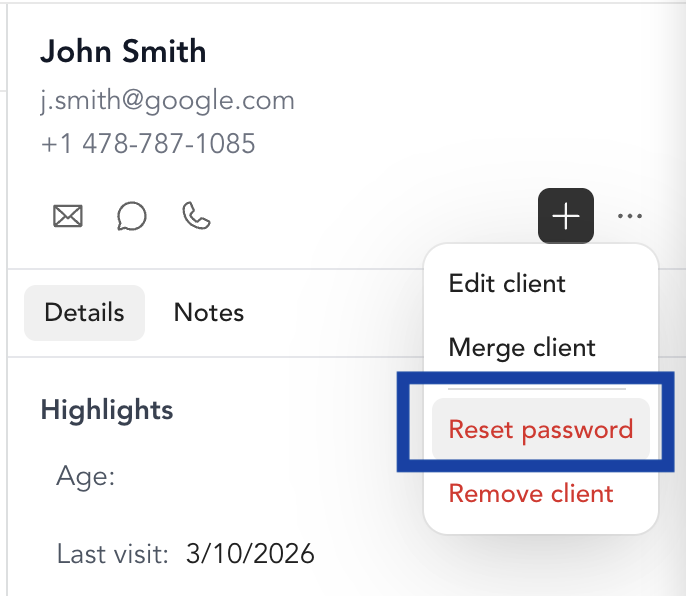
If a client can't find their account or is having trouble logging in, check their profile in Customers — search by email. If the account is there, use the Reset Password button on their profile to send them a new reset link.