
View booking history
See all past and upcoming bookings for a client from their profile.
Every class, appointment, and video access a client has is logged on their profile. You can see their full history, filter by type, and check the status of any booking.
Access booking history
- Go to Customers → Clients and open the client's profile
- Click the Reservations tab
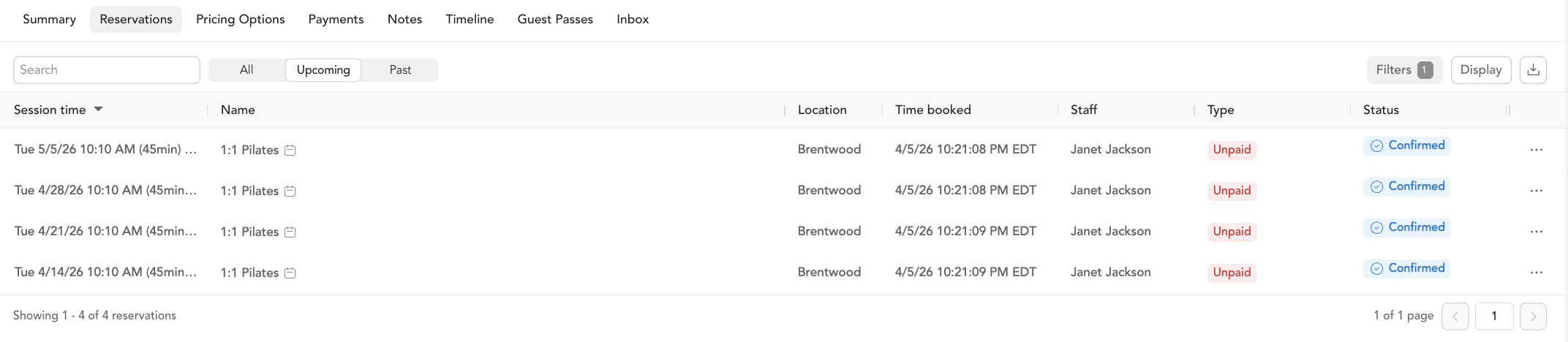
You'll see a list of all their reservations — past and upcoming — with details like class name, date, payment status, and reservation status.
What you can see
| Column | What it shows |
|---|---|
| Class / service name | What they booked |
| Date and time | When the class or appointment took place |
| Instructor | Who taught or led the session |
| Payment status | Paid, unpaid, refunded, etc. |
| Reservation status | Confirmed, checked in, late cancel, no-show, etc. |
| Payment method | How they paid (package, membership, drop-in, etc.) |
Filtering booking history
Use the filter controls at the top of the Bookings tab to narrow by:
- Date range
- Booking type (classes, appointments, videos)
- Reservation status
Using this for client conversations
Booking history is helpful when a client has a question about their account. You can quickly see if a class was marked as late cancel, whether a refund was processed, or how many credits they've used from a package.
Running reports instead
For bulk views across all clients, use the Reporting section instead. Reports like Booking Report, Late Cancel/No Show, and Attendance give you data across your whole client base. See booking reports.