
Time clocking
Track instructor hours with a PIN-based time clock.
The time clock lets instructors clock in and out using a PIN. You can use this for hourly staff or to track hours for salaried employees. Time card data feeds into payroll reporting.
Enable the time clock
- Go to Settings → Business Settings
- Scroll to the bottom
- Check Enable time clock

This must be done before instructors can use the time clock.
Set up time clocking for an instructor
- Go to Setup → Team
- Click on the instructor
- Click the Pay Rates tab
- Scroll to General Pay Rates
- Toggle the option on
- Select Salary or Hourly
- A PIN generates automatically for that instructor
Both salaried and hourly instructors can use the time clock — salaried employees appear in payroll reporting for tracking even if their rate is fixed.
Using the time clock
- Go to Setup → Time Clocking
- An instructor enters their PIN to clock in or out
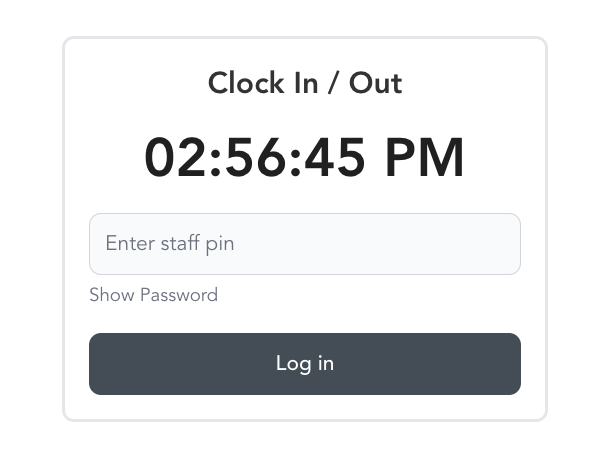
Star the Time Clocking page (⭐) to pin it under your Favorites for faster access — especially useful for a front-desk iPad or shared computer.
"Restricted page" when opening Time Clocking
If a team member clicks Time Clocking and sees "Oops! It seems you've attempted to access a restricted page," the time clock itself is fine — their role is missing the time clocking permission.
- Go to Staff → Team → Roles & Permissions
- Open the role that team member is assigned to
- Under Setup → Time Clocking & Time Cards, turn on View time clocking & time cards
- Have the team member refresh the dashboard
Check the role rather than Settings → Business Settings first: Enable time clock being on is account-wide, so it stays on even when a single role has lost access. If some team members can still reach the page and others can't, it is always the role, and only the roles that changed are affected.
Turning this permission off takes effect immediately, including for anyone who is already clocked in — they will not be able to clock themselves out. Restore the permission, or go to Setup → Time Clocking as an admin and edit their clock-out time by hand.
Finding a forgotten PIN
If an instructor doesn't remember their PIN:
- Go to Setup → Team
- Click on the instructor
- Click Pay Rates
- Scroll to the bottom — the PIN is displayed there
View time card data
Time clock entries appear in payroll reporting and can be exported with the standard payroll export.
A team member can also review their own entries on the Time Cards page (dashboard.arketa.com/dashboard/time-cards), which lists only the time cards from their own clock-ins. If that page shows No Time Cards Found, it means the team member hasn't clocked in yet — entries appear only after they clock in with their PIN (or a manager adds a time card for them). Turning on the View time clocking & time cards role permission controls access to time-card pages; it does not create entries on its own.