
ClassPass integration
List your classes on ClassPass and automatically sync rosters with Arketa.
ClassPass is a fitness marketplace where new clients discover and book classes. When connected to Arketa, your schedule automatically pushes to ClassPass and bookings made there sync back to your Arketa roster.
ClassPass is only available to studios with a physical location. ClassPass requires a brick-and-mortar address.
How it works
- Arketa automatically pushes your schedule and open spots to ClassPass
- When someone books on ClassPass, they're added to your Arketa class roster
- New ClassPass members can book without visiting your website
- ClassPass manages its own pricing to you — spots are typically discounted from your regular rate
Connect the integration
- Go to Settings → Integrations and click Enable ClassPass
- Note your ClassPass Venue ID from the integrations page
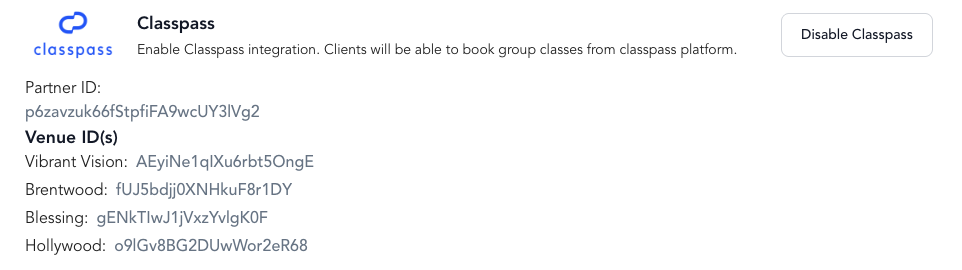
ClassPass takes up to 24 hours to sync after connecting. The integration is unavailable during this sync window. Connect on a slow day to minimize disruption.
Which classes appear on ClassPass
All classes created in Arketa automatically appear on ClassPass. There's currently no setting to exclude specific classes.
To set per-class booking limits for ClassPass, contact ClassPass support directly — this is managed in the ClassPass Partner Dashboard, not in Arketa.
Payments
ClassPass does not integrate with Arketa Payments. All payments for ClassPass bookings are settled directly between you and ClassPass through Tipalti (ClassPass's payment provider). There's no cost to you for listing on ClassPass.
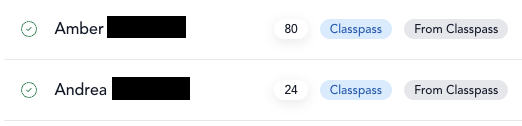
ClassPass bookings appear as $0.00 / Unpaid in Arketa — this is expected. Do not collect payment from ClassPass customers in Arketa or through your widget, as they're already paying ClassPass.
Checking in ClassPass clients
ClassPass attendees appear on your Arketa class roster just like regular clients. Check them in from Arketa — there's no need to use the ClassPass dashboard separately.
Check in all ClassPass clients before class begins. If a ClassPass client is checked in after class starts, ClassPass may pull outdated roster data, and the check-in may not reflect accurately on their end.
Liability waivers
ClassPass members book through ClassPass, not through your Arketa booking page, so they never reach the Arketa checkout where the waiver is collected. Enable signed liability waiver in Settings → Business applies to bookings made through Arketa — it does not block a ClassPass reservation.
Arketa handles the waiver after the booking instead:
- When a ClassPass member books and hasn't signed your waiver yet, Arketa automatically emails them a waiver signature request
- Until they sign, a red Liability Waiver flag appears next to their name on the class roster
- From the check-in screen you can open the waiver on your own device for them to sign, or text or email it again
If someone arrives without a signed waiver, collect it at check-in before class starts.
Client communications
ClassPass sends its own booking reminders to ClassPass members. However, if a ClassPass member has an email address on their Arketa profile, they'll also receive Arketa transactional emails — including no-show reminders sent 1 hour after class ends.
Changing locations
If you add a new physical location that should connect to ClassPass:
- Update your classes in Arketa to use the new location
- Contact ClassPass with the new Location ID (found in Settings → Integrations → Venue ID)