
Booking windows
Control how far in advance clients can book, when booking closes, and how delayed scheduling and member perks interact.
Booking windows control the time frame in which clients can book a class. You can set how far in advance booking opens, when it closes, and when cancellations are no longer allowed. These settings also interact with delayed scheduling and member perks if you use those features.
The three booking window settings
| Setting | What it controls |
|---|---|
| Booking opens | How far in advance a client can book. Default: 90 days |
| Booking closes | How long before class starts booking is cut off. Use a negative value to keep booking open past the start time (e.g., -15 means booking stays open 15 minutes after class starts) |
| Cancel closes | How far in advance a client must cancel to get a refund. Default: 0 (cancellations not allowed) |
Edit your booking windows
- Go to Settings → Booking Windows
- Update the values for classes/events/workshops and private bookings
- Changes save automatically
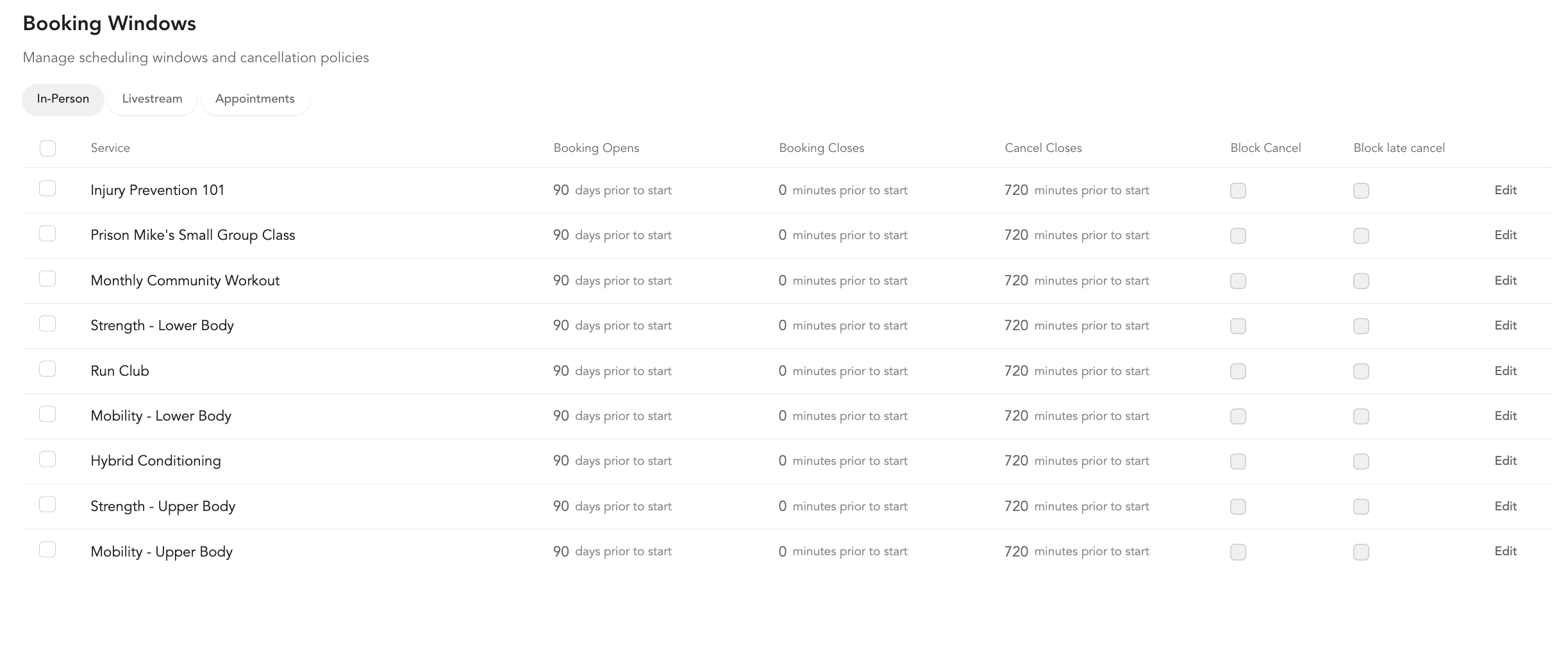
These are global defaults. They apply to any new class template you add. Existing classes already use whatever window was set when they were created.
Default settings
Classes, events, and workshops:
- Booking opens: 90 days in advance
- Booking closes: -15 (15 minutes after class starts)
- Cancel closes: 0 (cancellation permitted up until start time)
Private bookings:
- Booking opens: 90 days in advance
- Booking closes: 48 hours in advance
- Cancel closes: your global cancellation policy
Delayed scheduling
Delayed scheduling controls when a class appears on the public schedule and becomes bookable — separate from how far in advance the booking window opens. You configure this at the recurring class level, not globally, under Delay scheduling availability on the class's Pricing step.
You choose between two modes:
| Mode | What it does |
|---|---|
| Specific Date | The class opens on one calendar date and time you pick. Best for a one-off launch. |
| Relative Date | The class opens on a repeating day of the week, a set number of weeks before the class. Best for weekly "schedule drop" studios. |
How Relative Date counts
With Relative Date you pick a drop day (Sun–Sat), a number, Week, and a time. The number counts how many weeks before the class's own week the drop happens — it is not a count of days before the class.
| You set | When the class opens |
|---|---|
| 0 Weeks | The drop day immediately before the class |
| 1 Week | One week earlier than that |
| 2 Weeks | Two weeks earlier than that |
Example: a Thursday class with the drop day set to Sunday at 5:00 PM. At 0 Weeks it opens the Sunday four days before the class. At 1 Week it opens the Sunday eleven days before.
If you want the upcoming week's classes to open on the drop day right before them, set the number to 0, not 1. Setting 1 opens every class a full week earlier than you expect.
If you don't pick a drop day
The drop day pills toggle. Click a selected day again and it switches off, leaving the class with no drop day — and that changes how the release is counted. Without a drop day, each class opens on its own date, the set number of weeks earlier, at the time you chose. Classes then appear on your schedule a few at a time as each one reaches its own drop point, instead of a whole week landing at once.
| You set | When a Wednesday 6:00 PM class opens |
|---|---|
| 2 Weeks, drop day Monday | Two Mondays before the class's week, at your chosen time — together with every other class that week |
| 2 Weeks, no drop day | The Wednesday two weeks before the class, at your chosen time — on its own |
If your classes are appearing on the public schedule a few at a time rather than a week at a time, check whether the drop day is switched off. The note under the control always describes which of the two you currently have.
One more rule applies when your drop day falls later in the week than the class itself. For example, a Tuesday class with Friday as the drop day: that week's Friday comes after the class has already happened, so Arketa moves the drop back to the previous Friday. The dashboard shows a note under the control describing exactly what your current settings will do — read it before saving.
Changing the delay on one class updates only that class. To change it across a recurring series, edit the series from Setup → Service Types.
How booking windows and delayed scheduling interact
These two settings can conflict if not configured correctly:
| Booking window | Delayed scheduling | Result |
|---|---|---|
| 14 days | 30 days before class | Class appears on schedule 30 days out, but clients can't book until 14 days before |
| 90 days | 7 days before class | Class appears and becomes bookable 7 days before — this is the recommended setup |
Best practice: Set your global booking window high (90–180 days) and use delayed scheduling to control when classes become visible. This ensures classes are generated far enough in advance and avoids the situation where a class shows but can't be booked.
Member perks: early booking access
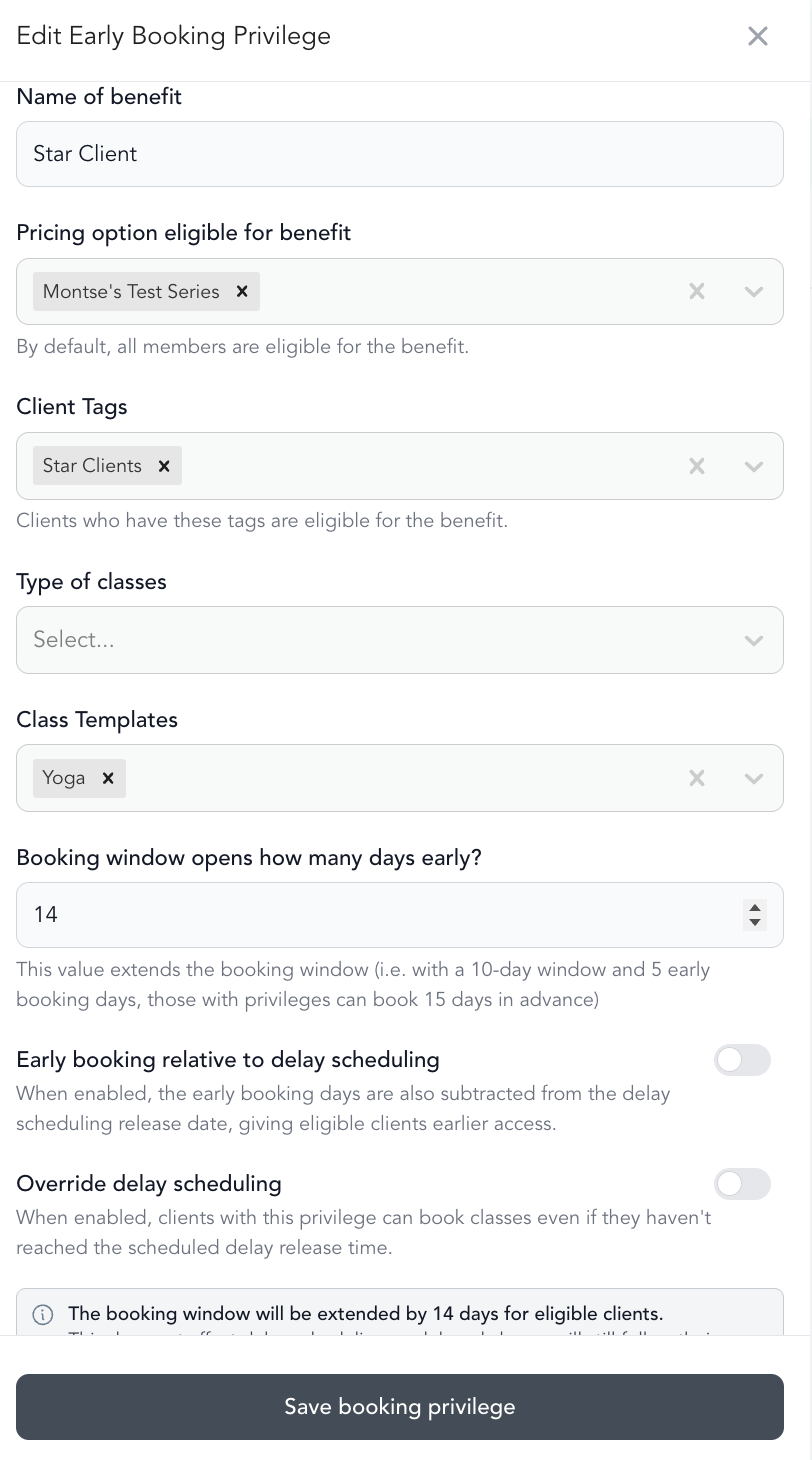
If you want members to be able to book earlier than the general public, use Member Perks → Early Booking Privileges in Settings.
Example setup:
- Delayed scheduling: classes drop 7 days before class at noon
- Member perk: 7 days early access for active members
- Result: members can book 14 days before class; the public can book 7 days before — both at noon
When using delayed scheduling with member perks, set your global booking window to 90+ days so classes are generated far enough into the future for members to actually book them early.
Weekly schedule drop example
Goal: All classes for the following week open every Monday at noon.
Setup:
- For each recurring class, set delayed scheduling to: Drop 7 days before class at Monday, 12:00 PM
- Set global booking window to 90+ days
- Optionally add a member perk for early access
What happens: On Monday January 12 at noon, all classes scheduled for Monday January 19 become bookable at once. Classes for January 26 open on January 19 at noon, and so on.