
Video reports
See which on-demand videos are getting the most views.
Top Viewed Videos
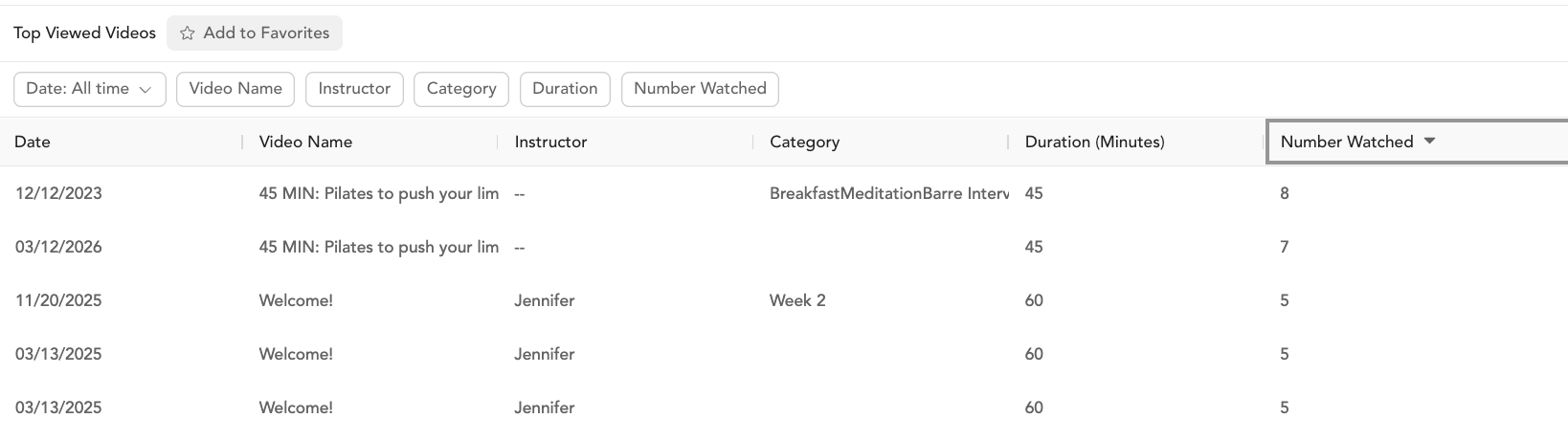
Shows your most-watched on-demand videos in a date range.
Columns
| Column | Description |
|---|---|
| Date | Date the video was last watched |
| Name of the video | Video title |
| Instructor | Instructor who taught the class |
| Categories | Video categories |
| Duration (minutes) | Video length |
| Number booked | Total views in the selected date range |
Filters
Date range, video name (multiple), instructor (multiple), category (multiple), duration range, view count range.
How to use this report
- Surface top content — feature your most popular videos prominently in the app or on-demand library
- Identify underperformers — videos with very low views may not be discoverable or may not match what your audience wants
- Track instructor performance — see which instructors' content gets the most views
- Content planning — understand what categories your audience watches most to guide future content production
On Demand Video Bookings
The On Demand Video Bookings report shows individual video view records — one row per client per video view. Use this when you need a detailed, transaction-level log of who watched what and when, rather than an aggregated summary.
Columns
Client, email, video title, date viewed, instructor, category, pricing option used.
Filters
Date range, video name, instructor, category.
Export
Click Export → choose CSV or PDF → Download.
Was this helpful?