
All Payments report
See every payment transaction with status, category, and revenue details.
The All Payments report is the most comprehensive payment view — every transaction in your system, regardless of status.
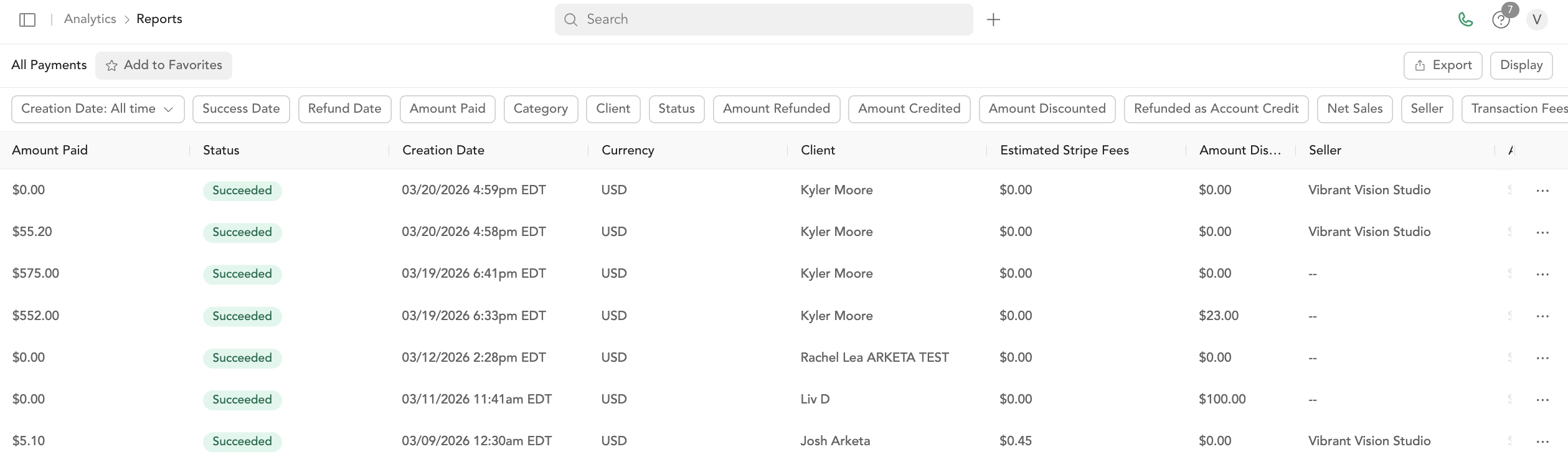
Columns
| Column | Description |
|---|---|
| Amount | Transaction amount |
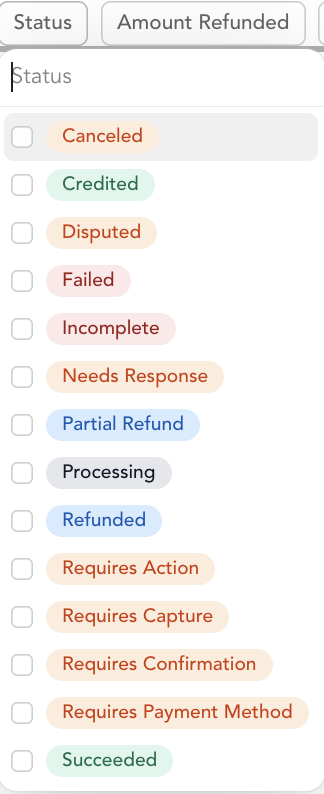
| Status | Payment status (succeeded, failed, refunded, disputed, partial refund, etc.) |
| Date | Transaction date |
| Description | What was purchased |
| Customer | Client name |
| Location | Where the sale was made |
| Client email | |
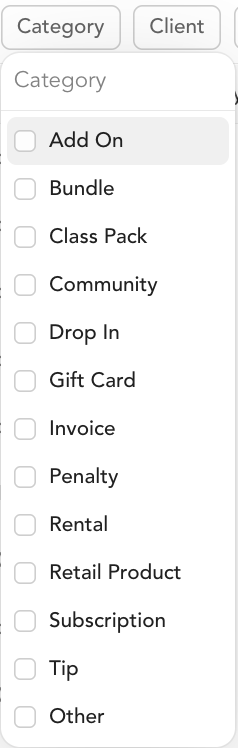
| Category | Product type (class pack, subscription, drop-in, bundle, gift card, retail, tip, invoice, penalty, other) |
| Payment ID | Unique payment identifier |
| Invoice ID | Invoice number (when applicable) |
| Currency | Payment currency (USD, CAD, etc.) |
| Total refunded | Amount refunded |
| Net sales | Revenue minus returns |
| Seller name | Team member who made the sale |
| Transaction fees | Arketa transaction fee |
| Estimated Stripe fees | Stripe processing fee |
Filters
Filter by date range, status, category, customer, location, and amount ranges.
Related reports
- Total Sales — same columns but filtered to successful payments only
- Failed Payments — same columns filtered to failed payments
- Refunds — refund-specific view
Was this helpful?