
Retail payment reports
Track retail product sales by payment, product, variant, supplier, and category.
Retail Payments

All retail product purchase transactions.
Columns: Amount, status, date, description, customer, location, email, payment ID, currency, total refunded, net sales, seller, transaction fees, estimated Stripe fees, tax, source (point of sale, widget, invoice, etc.), payment type (cash, card).
Filters: Date range, amount, customer, status, seller, source.
Sales by Retail Product
Revenue broken down per individual retail product.
Columns: Product name, units sold, total revenue, net revenue.
Use this to identify your best-selling products and inform purchasing decisions.
Sales by Retail Product Variant
Revenue broken down per individual product variant (e.g., size, color).
Columns: Product name, variant name, units sold, total revenue, net revenue.
Use this to see which specific variants are selling best and manage inventory at the variant level.
Sales by Retail Product Supplier
Revenue grouped by supplier/vendor.
Columns: Supplier name, total sales, units sold.
Use this to evaluate supplier performance and negotiate purchasing terms.
Sales by Retail Product Category
Revenue grouped by product category.
Columns: Category name, total sales, units sold.
Useful if you've organized your retail catalog into categories (apparel, supplements, accessories, etc.).
Inventory Report of Retail
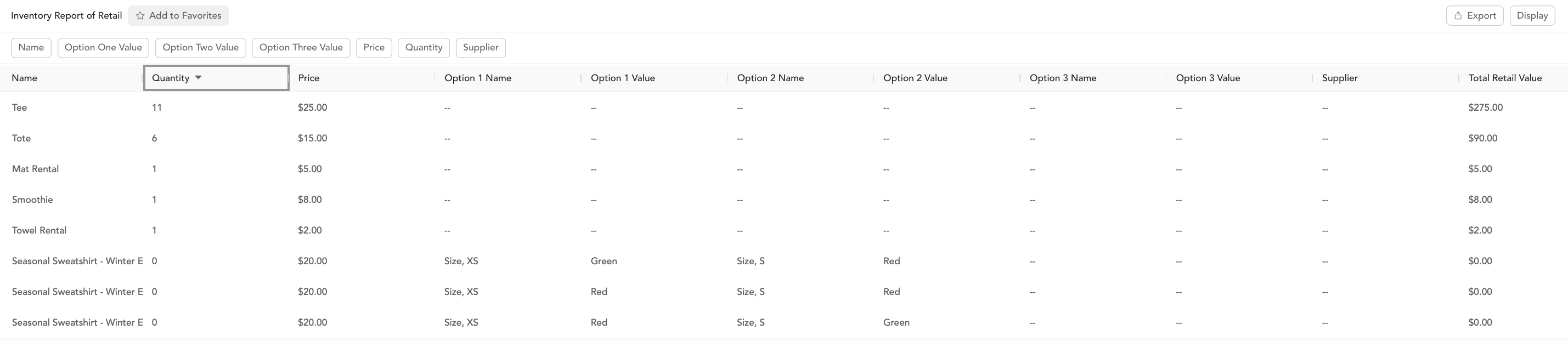
Current stock levels across all products and variants.
Columns: Name, quantity, price, supplier, SKU, product ID, parent product ID, barcode.
Filters: Product name, price, quantity, supplier.
Use this to identify items that need restocking before they run out.