
Hide pricing options
Remove a pricing option from your public pricing page without deleting it.
Hiding a pricing option removes it from your public-facing pricing page so new clients can't find or purchase it. Existing holders keep their access. You can unhide it at any time.
Hide a pricing option
- Go to Setup → Pricing Options
- Click the three dots next to the option → Edit
- Check the Hidden box
- Save
The option disappears from your booking page immediately. It still appears in your dashboard for management.

Why hide instead of delete
- You might bring it back later (seasonal offers, testing)
- Existing clients still use it — deleting removes it from their view too
- You want to offer it selectively by direct link only
Share a hidden pricing option by link
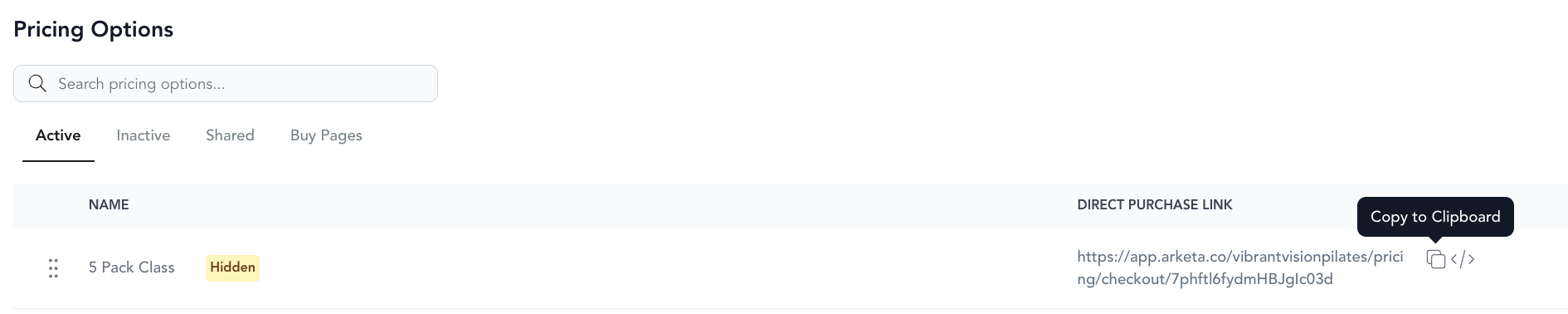
Even when hidden, you can share a direct purchase link for the option. This is useful for:
- Offering a special rate to specific clients without making it public
- Sending a VIP offer via email
- Selling a membership with a future start date to a single client
To get the direct link:
- Go to Setup → Pricing Options
- Click Share or Copy link next to the hidden option
- Send it directly to the client
Only people with the link can purchase it.
Example: A free unlimited pack for friends and family
Want to give someone — a friend, a family member, or a longtime supporter — unlimited classes on the house? Create a hidden $0 pack and share the link with just that person:
- Go to Setup → Pricing Options
- Click Add New and choose Class Pack
- Set the number of classes to a very high number (like 999999) so it effectively never runs out
- Set the price to $0
- Check the Hidden box so it stays off your public pricing page
- Save
- Copy the direct link and send it to that person to redeem
Because the pack is hidden, no one else can see or buy it — it's yours to give away.
Unhide a pricing option
Edit the option and uncheck the Hidden box. It will reappear on your public pricing page.