
Edit, share, and delete videos
Manage your video library — update details, share links, duplicate, or remove videos.
All video management actions live in the Beyond Classes → On-Demand Video tab. Each video has a set of actions accessible from its menu.
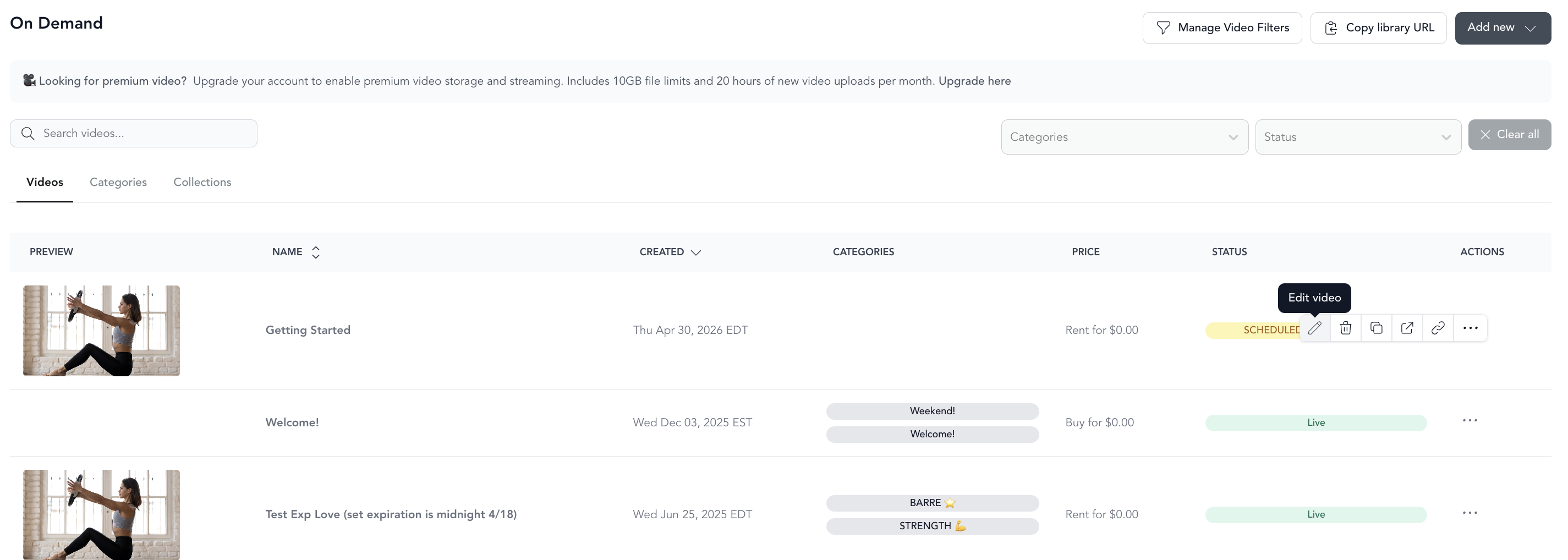
Edit a video
Click the edit (pencil) icon next to any video to update its details, categories, filters, pricing, or scheduling settings. All the same fields from the upload flow are available when editing.
Share a video
To get a direct link to a video:
- Find the video in your library
- Click Copy Checkout URL — this copies the direct booking/viewing link
- Or click View to open the video page in a new browser tab

Use the Checkout URL in email campaigns, social media posts, or ads to send clients directly to a specific video.
Duplicate a video
Duplicating creates a copy of the video with all its details — name, thumbnail, filters, description. The copy won't inherit the original's category assignments, so you'll need to add it to categories manually.
Duplicating is useful when:
- Copying content from your on-demand library into a community (see video in communities)
- Creating a variation of an existing video with slightly different settings
- Setting up the same content under different pricing configurations
Delete a video
Click Delete Video from the video's action menu.
Deleted videos can't be recovered. If you want to remove a video from your library temporarily, use the Hidden setting instead — the video stays in the system but isn't visible to clients.
Hiding a video
Instead of deleting, you can hide a video:
- Edit the video
- Check the Hidden box at the bottom of settings
- Save
Hidden videos remain in your dashboard and can be unhidden at any time. Clients can still access them via direct link if you've shared one.