
Custom confirmation emails
Customize the confirmation email clients receive after booking a class or appointment.
Arketa sends automatic confirmation emails when clients book. The content comes from multiple places — you can customize each part.
What's in a confirmation email
A booking confirmation includes:
-
Class details — class name, instructor, date and time (in the client's timezone), location or livestream link, and an option to add to calendar. This pulls directly from the scheduled class.
-
How to prepare — custom text you write for each class type. This is where you can add what clients should bring, wear, or know before their first class. Pulled from your confirmation email template for that service type.
-
Referral program — if you have a referral program enabled, this appears automatically with the client's referral code and link.
Edit a confirmation email template
Confirmation emails are organized by class/service type, so you can send a different message for a yoga class versus a personal training session.
- Go to Settings → Confirmation Emails
- Find the template you want to edit
- Click Edit
- Update the body text
- Click Save changes
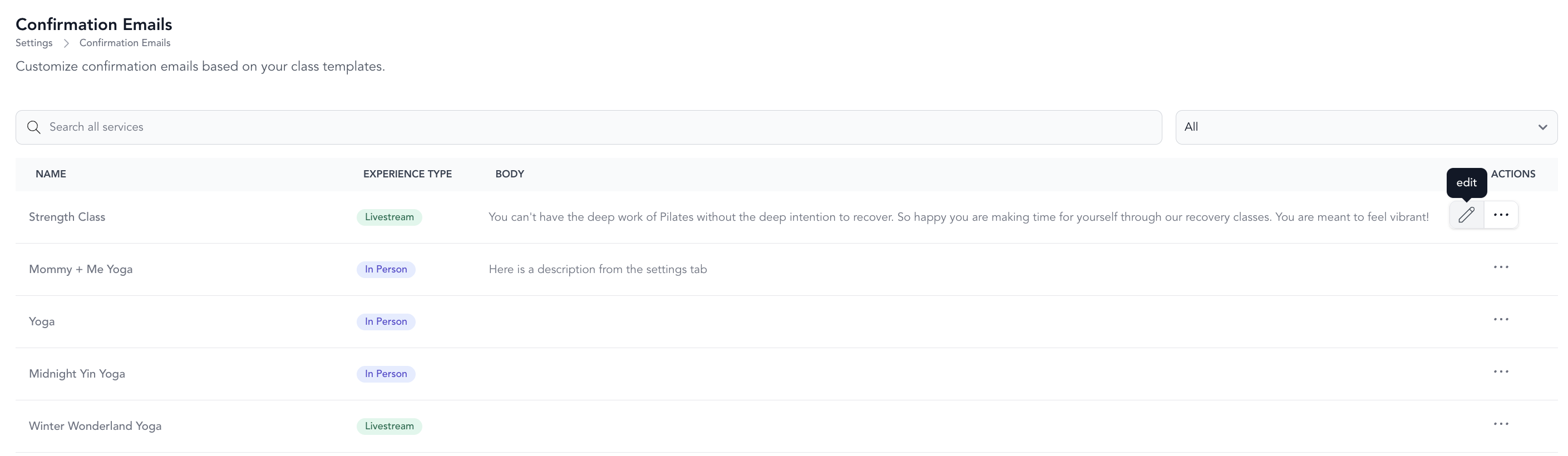
Editing a confirmation email template affects all previously scheduled classes built on that service type — not just future ones.
Default confirmation text
If you don't set up a custom template for a service type, the confirmation email pulls the default text from Settings → Business Settings (scroll to the bottom).
This is useful if you want the same message across all your classes without managing separate templates.
Where confirmation content appears
| Content source | Where it shows |
|---|---|
| Service type checkout confirmation text | Checkout confirmation page after booking |
| Pricing option purchase confirmation | Purchase confirmation email after checkout |
| Confirmation email template | Class booking confirmation email |
When you enable and customize a transactional email for a specific booking type, that overrides the confirmation email template settings.
Zoom link timing
If you use the direct Zoom integration, the meeting link won't appear in the confirmation email — it's blank until 24 hours before class. It will be included in the reminder email instead.