
Broadcast results
Track the performance of your email and SMS campaigns.
After sending a broadcast, you can see how it performed — who opened it, who clicked, who unsubscribed, and more.
View broadcast results
- Go to Marketing → Broadcasts
- Click on the campaign name
- Results appear on the campaign detail page
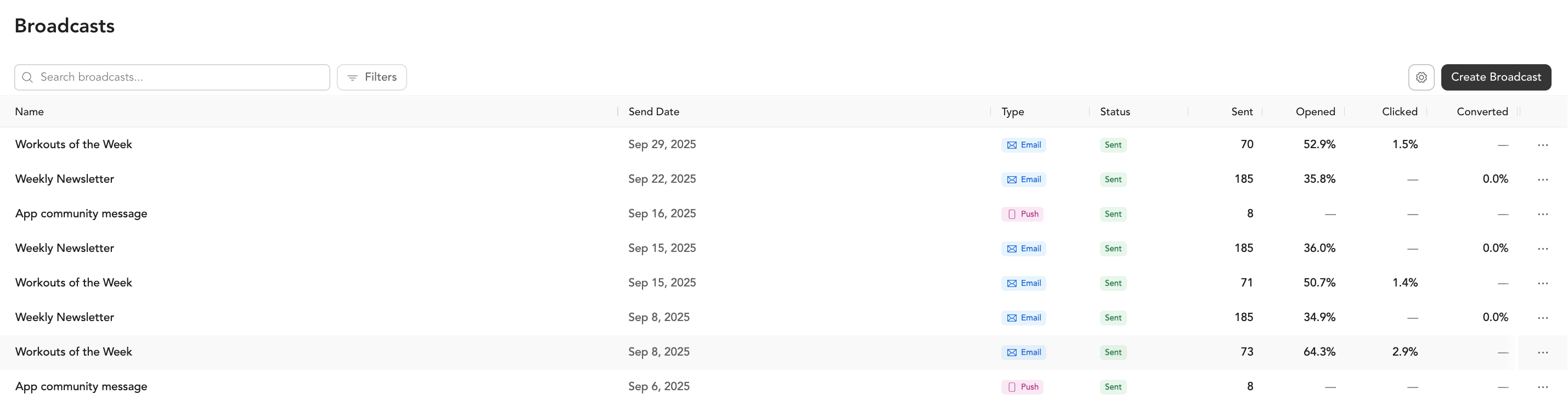
Email metrics
| Metric | What it means |
|---|---|
| Delivered | Number of emails successfully delivered to inboxes |
| Opens | How many recipients opened the email |
| Open rate | Opens ÷ delivered (industry average for fitness is ~20–30%) |
| Clicks | How many times links in the email were clicked |
| Click rate | Clicks ÷ opens |
| Converted | Number of recipients who completed the broadcast's goal (e.g., purchased a specific pricing option) within the attribution window |
| Conversion rate | Conversions ÷ delivered |
| Unsubscribes | Clients who opted out after receiving this email |
| Bounces | Emails that couldn't be delivered (invalid address, full mailbox) |
| Spam reports | Recipients who marked it as spam |
How conversion tracking works
When you set a goal on a broadcast (for example, selling a specific membership or intro offer), Arketa tracks whether recipients complete that goal within the attribution window — regardless of how they got there.
A client does not need to click or open the email to count as a conversion. If someone completes the goal action through any path — clicking a link in the email, navigating directly to your site, or purchasing through the app — they're counted as a conversion as long as it happens within the attribution window.
This is why conversion rate can be higher than click rate. The two metrics are measuring different things:
- Click rate measures engagement with the email itself (clicks ÷ opens)
- Conversion rate measures goal completion across all paths (conversions ÷ delivered)
They are not directly connected, so it's expected that conversion rate may exceed click rate.
SMS metrics
SMS broadcasts do not currently show in-dashboard analytics. On the Broadcasts list, the metric columns (Sent, Opened, Clicked, Converted) display N/A for SMS campaigns — unlike email, text messages don't report opens, clicks, or delivery back to Arketa, so there are no metrics to display.
N/A does not mean the broadcast failed. As long as the broadcast status shows Sent, your message went out to your opted-in SMS audience. To confirm delivery for a specific client, open their profile — the sent text appears in their inbox thread (marked "Sent from broadcast") and on their timeline, along with any reply they send back.
What good looks like
Email benchmarks vary, but for fitness and wellness:
- Open rate: 25–35% is solid
- Click rate: 3–8% on opened emails
- Unsubscribe rate: Under 0.5% per send is healthy
Higher unsubscribes often mean your list is too broad or you're sending too frequently to people who aren't engaged.
Improving performance
- Subject lines — be specific and create curiosity. "New class schedule" gets fewer opens than "Tuesday just got better"
- Send time — early morning (6–8am) and late afternoon (4–6pm) tend to perform better for fitness
- Segmentation — sends to targeted segments outperform sends to your whole list
- Frequency — 1–2x per week is usually the sweet spot; daily burns out your list quickly