
Client and session notes
Add long-term client notes and appointment-specific session notes.
Client notes
Client notes are general notes that live on a client's profile and persist across all their interactions. Use them for anything you want to remember about a client regardless of the specific class or appointment.
Add a client note:
- Go to Customers → Clients and open the client's profile
- Click the Notes tab
- Click Add Note
- Write your note and save
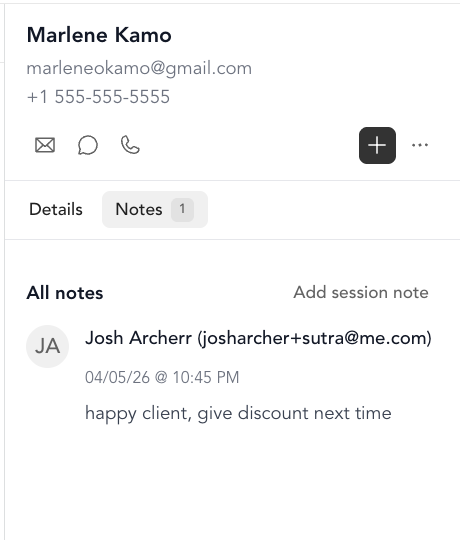
Good uses for client notes:
- Health history or injuries
- Preferred class level or modifications
- Goals and progress over time
- Business-relationship context (e.g., referred by, works in an office, training for a race)
Session notes (appointments)
Session notes are tied to a specific appointment. They're separate from client notes — use them to track what happened in each individual session.
Add a session note from the calendar:
- Go to Classes → Appointments
- Click on the appointment
- Select Add session note from the Actions menu
- Write your note and save
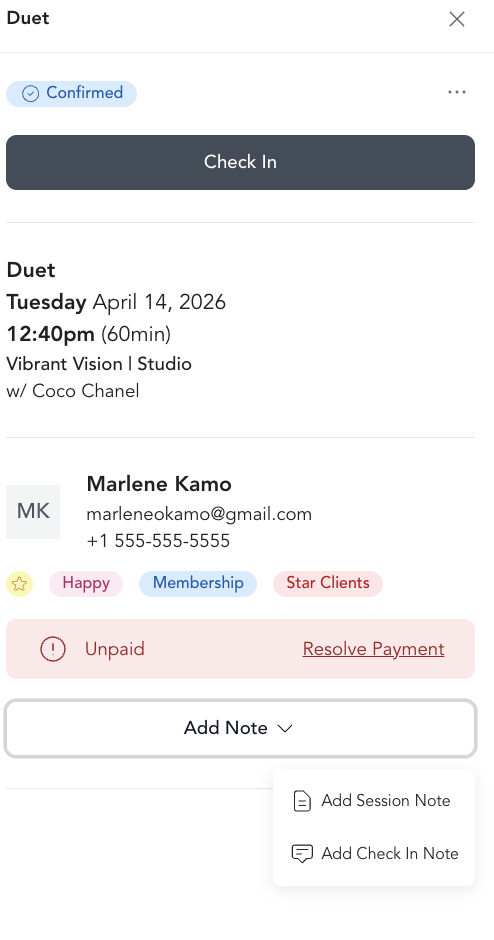
Add a session note during check-in: Some check-in workflows also let you add a note at the time of check-in for appointments.
Session notes are visible on the appointment detail and also appear in the client's Timeline, so you have a chronological record of every session.
Best practices
- For personal trainers and therapists: add session notes after every appointment to track what you covered, what the client struggled with, and what to focus on next time
- For group fitness: keep client notes for any health or safety information instructors should know about
- Keep notes factual and professional — these are internal records but could theoretically be reviewed