
Modify an appointment
Edit, reschedule, cancel, or add notes to an existing appointment.
All appointment management happens directly from the calendar. Click on any appointment to open it, then use the Actions menu to make changes.
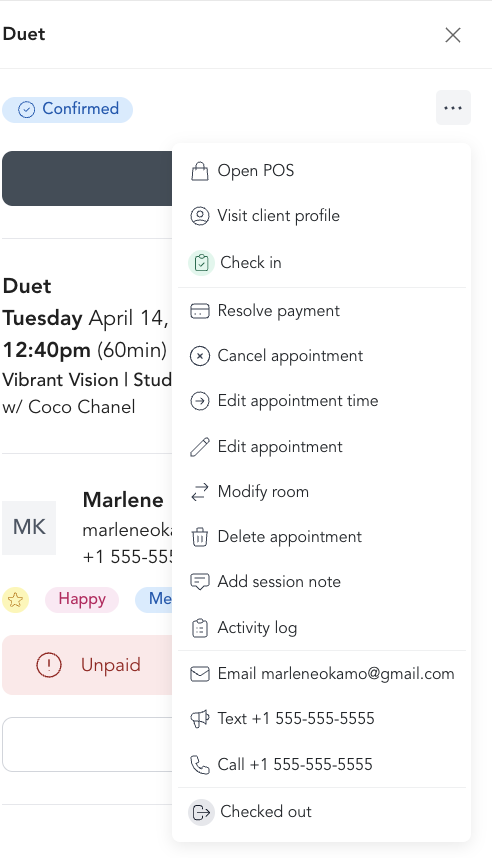
Available actions
| Action | What it does |
|---|---|
| Update payment method | Swap the payment method on the booking |
| Edit appointment time | Reschedule to a different day or time |
| Modify room | Move the appointment to a different room |
| Cancel appointment | Cancel a single appointment or all future instances in a series |
| Late cancel appointment | Mark the appointment as a late cancellation |
| Delete appointment | Permanently remove the appointment from the calendar |
| Add session note | Write a private note tied to this specific appointment |
Marking a no-show
If a client doesn't show up, don't check them in during or after the session. Arketa automatically marks unchecked appointments as no-shows once the session time has passed.
You can also manually mark a no-show from the Actions menu if needed.
Rescheduling
Click Edit appointment time to move the appointment to a new date and time. The client receives an updated confirmation email with the new details.
Session notes
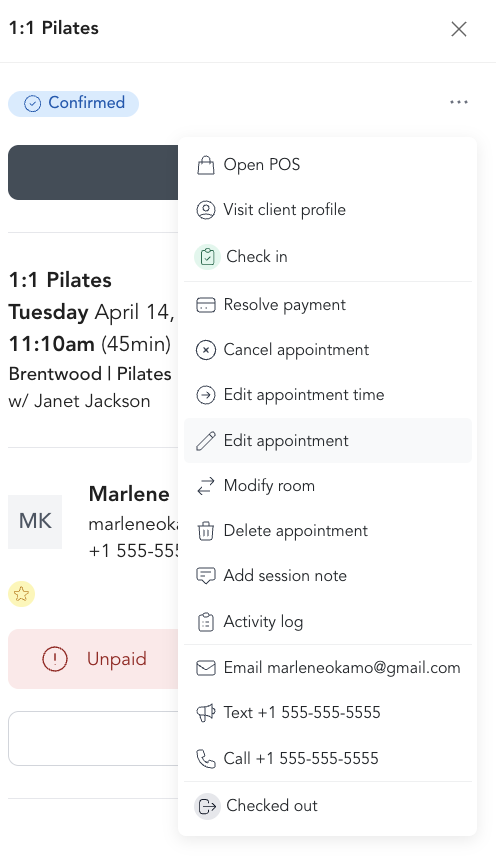
Use Add session note to add notes specific to that appointment — client progress, what you worked on, things to follow up on. Notes are private to staff and visible on the appointment detail. They're separate from general client notes on the client's profile.
Session notes are a great habit for personal trainers and therapists — they make it easy to pick up right where you left off at the next session.
Refunds on cancellation
When you cancel an appointment:
- If the client paid drop-in, you'll be prompted to issue a refund
- If they used a package credit, the credit is returned to their account
- If they're on a membership, no credit is deducted since memberships are charged on a billing cycle