
Email suppression list
How Arketa automatically protects your sender reputation by skipping problematic email addresses
The email suppression list is a "do not email" list that Arketa maintains automatically. When an email address signals a problem — a bounce or a spam complaint — Arketa adds it to the list and quietly skips it on future sends. You don't have to manage this yourself.
How addresses get added
Two events trigger automatic suppression:
| Event | What happened |
|---|---|
| Bounce | The email couldn't be delivered — the address doesn't exist, the inbox is full, or the domain is inactive |
| Spam complaint | The recipient clicked "Mark as spam" in their email app |
When either happens, Arketa adds the address immediately. Your other clients are unaffected — only that address is suppressed on future sends.
Why this matters
Email providers like Gmail and Outlook track your sending behavior. If you repeatedly send to addresses that bounce or generate spam complaints, they start treating all your emails as spam — including messages to clients who want to hear from you.
A damaged sender reputation means:
- Your emails land in spam folders across your entire list
- Open and click rates drop, even for engaged clients
- In serious cases, your sending account can be flagged or suspended
The suppression list acts as a buffer. By automatically removing problem addresses before your next send, it prevents you from re-triggering the same signals and keeps your reputation intact.
Suppression applies to all outgoing emails from Arketa — broadcasts, automations, and transactional messages like booking confirmations.
Manage your suppression list
Go to Settings → Email Suppression List to view and manage suppressed addresses.
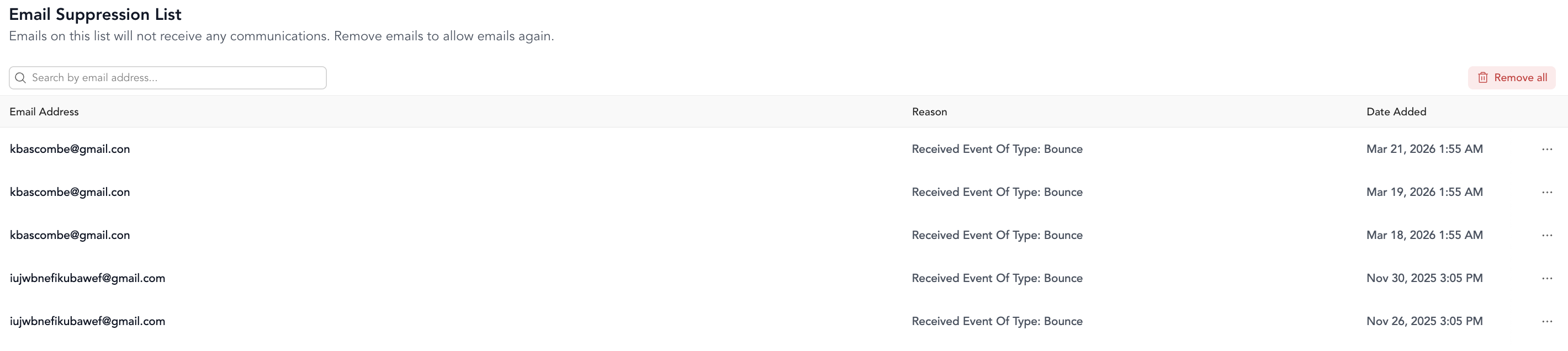
From here you can:
- See every suppressed address and the reason it was added
- Search for a specific email address
- Remove an address if you believe it was added by mistake
If a client says they're not receiving your emails, check whether they're on the suppression list. A common cause is a temporary full inbox that has since been cleared — in that case, removing them is safe.
Only remove an address if you're confident the original issue is resolved. Re-sending to a genuinely bad address will generate another bounce, which continues to hurt your reputation.
To meet anti-spam and marketing compliance rules, an address can only be removed from the suppression list once per month. If someone lands back on the list after you've already removed them, you'll need to wait for the next monthly window before you can remove them again. Forcing a send to a still-suppressed address won't work — it will only generate more bounces.