
Check in with your barcode
Show your barcode at the front desk to check in quickly when you arrive
Some studios let you check in by showing a barcode on your phone. When you arrive, show it to the front desk — they scan it and you're checked in. No waiting in line to give your name.
Depending on your studio's settings, check-in may use geolocation (your phone confirms you're at the studio) or a barcode you show to staff. Your studio decides which experience you see.
Find your barcode
From Home (barcode check-in)
- Open your studio's branded mobile app
- On the Home screen, tap Check-in (bottom-right)
- Your barcode appears with the current date and time on the screen — staff use that to confirm you're showing a live screen, not a screenshot
From Account
- Open the Account tab
- Your barcode appears below your profile info
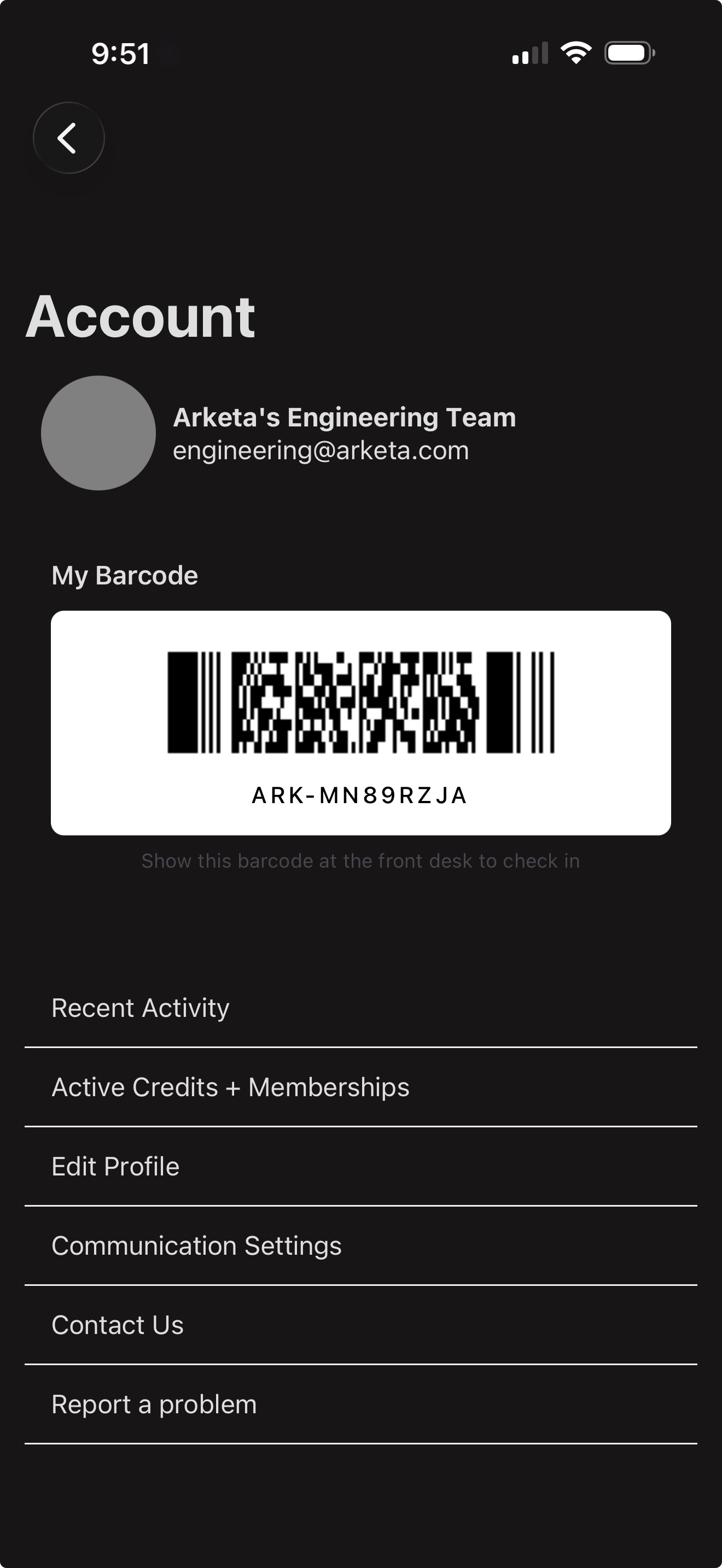
Your barcode is created automatically the first time you open the Account page. You don't need to do anything to set it up.
How to use it
When you arrive at the studio, open the app and either tap Check-in on Home or go to the Account tab — then show the barcode on your screen to the person at the front desk. They'll scan it with a barcode reader and you'll be checked in.
Increase your screen brightness before showing your barcode. Scanners read barcodes more reliably on a bright screen.